Hi, my search to build an amazing CRT setup for my NES, SNES, and N64 has led me here. Please let me know if this is not the correct place to post this.
I don't know too much about RGB gaming, but I have been getting more interested and educated lately. I just watched Phonedork's video "Classic Gaming on a Sony BVM20F1U, Ultra HDMI, and HIDEF NES" on YouTube and was blown away. Price isn't much of a limit to me, and I am willing to save my money for months just so I can complete my setup. I am currently working with these systems...
Unmodified Generation NEX
Unmodified Super Nintendo Entertainment System model SNS-001
Unmodified Nintendo 64 (NS1 serial number)
I will probably replace the Generation NEX with an actual Nintendo Entertainment System model NES-001 but I want to consult with you guys before making any more moves.
My goal is to have all three systems running on an amazing CRT monitor and their audio going through an amplifier and played through floor-standing speakers.
Where do I start? Would it be wise to purchase these services from RetroFixes?
N64 RGB Mod Installation Service
Super Nintendo SNES Upgrade & TuneUp Service + RGB Vertical line FIX
After these services have taken place, what would probably be the best monitor for my setup? Seems like 99% of the games I'll be playing will be 240p, with the exception of a couple 480i N64 games. Would the Sony BVM20F1U possibly be my best choice? What about the Sony BVM BVM D24E1WU? Do either of these monitors have three separate RGB inputs, or will I have to get some kind of switchbox such as an Extron matrix switcher? And how will I separately run the audio to an amplifier via RCA? (was thinking about Rogue Audio's Sphinx integrated amplifier)
And besides the monitor and possibly a switchbox, what other equipment will I need? Some kind of syncing equipment? And what about the specific audio/video cables?
Thank you so much
Building my perfect NES/SNES/N64 setup
-
RdCrestdBreegull

- Posts: 66
- Joined: Sun Sep 18, 2016 12:26 am
-
neorichieb1971
- Posts: 8024
- Joined: Wed Jan 26, 2005 1:28 am
- Location: Bedford, UK
- Contact:
Re: Building my perfect NES/SNES/N64 setup
I know my opinions would be going against the grain here.
I would just buy a decent CRT with component video. Get some cables from HDretrovision (SNES is sold out unfortunately). They work with the N64 if its modified in a certain way.
But ultimately your going after the holy grail of RGB and personally I would only undertake this project if you have a lot of time, patience, money and don't mind getting dud monitors. You'll also need to undertake a lot of work yourself to get the desired results so a basic understanding of how RGB works is paramount.
I think you will end up on forums for the next 5 years wondering how to make whatever you end up with, even better.
I would just buy a decent CRT with component video. Get some cables from HDretrovision (SNES is sold out unfortunately). They work with the N64 if its modified in a certain way.
But ultimately your going after the holy grail of RGB and personally I would only undertake this project if you have a lot of time, patience, money and don't mind getting dud monitors. You'll also need to undertake a lot of work yourself to get the desired results so a basic understanding of how RGB works is paramount.
I think you will end up on forums for the next 5 years wondering how to make whatever you end up with, even better.
This industry has become 2 dimensional as it transcended into a 3D world.
-
Taiyaki
- Posts: 1052
- Joined: Fri Apr 04, 2014 11:31 pm
Re: Building my perfect NES/SNES/N64 setup
I agree with the above. Go with a (preferably high end) consumer CRT. You can get high end models in practically all sizes, just pick what works for you. All three of those consoles could hook up via good (and I have to emphasize "good") S-video cables, and you wouldn't even notice the difference with component much really. This is coming from someone who's tried it all up to the highly praised and beloved BVM-20G/F1U pro monitors sets using excessively shielded rgb scart cables.
The general consensus for best consumer tv's depends on whether you prefer shadow mask or aperture grille. For apperture grille generally people favor the Sony Trinitron sets (they pioneered the technology after all), mostly anything in the FV line up is great. The set I use is an FV300 model. The near identical FV310 is often said on message boards to be the preferred consumer crt of many users. Either model will give you an incredible picture.
RGB on a pro monitor can give off a nice look but if you want my two cents it's completely overrated. You're experience will be completely different than from crt's as you knew them growing up. They have such fine pitch that you won't be able to see the mask/grille unless you put you're face in the screen. The result is that the image will look blocky with thicker looking scanlines, something closer to what you get on emulators with a good filter or shader, only without input delay. Again just my opinion.
The general consensus for best consumer tv's depends on whether you prefer shadow mask or aperture grille. For apperture grille generally people favor the Sony Trinitron sets (they pioneered the technology after all), mostly anything in the FV line up is great. The set I use is an FV300 model. The near identical FV310 is often said on message boards to be the preferred consumer crt of many users. Either model will give you an incredible picture.
RGB on a pro monitor can give off a nice look but if you want my two cents it's completely overrated. You're experience will be completely different than from crt's as you knew them growing up. They have such fine pitch that you won't be able to see the mask/grille unless you put you're face in the screen. The result is that the image will look blocky with thicker looking scanlines, something closer to what you get on emulators with a good filter or shader, only without input delay. Again just my opinion.
Last edited by Taiyaki on Sun Sep 18, 2016 5:25 am, edited 4 times in total.
-
tjstogy

- Posts: 341
- Joined: Tue Sep 01, 2015 1:27 am
- Location: New York
Re: Building my perfect NES/SNES/N64 setup
Agreed with above advice. After getting my dream pvm 20l5 I'm considering a good consumer grade Sony crt instead. Get a nice big 27" or up screen with component input. To go all out, modify any applicable consoles to scart, get a scart switcher, and a scart to component converter. Imho. I'd also advise you to shop around for mod services. Some modders don't return emails, and some are overly expensive.
-
RdCrestdBreegull
- Posts: 66
- Joined: Sun Sep 18, 2016 12:26 am
Re: Building my perfect NES/SNES/N64 setup
Damn. And here I thought I was going to be saving up for RGB equipment and getting all this fancy stuff... hehe
Hmm... Damn, okay, so should I go S-video or component? Right now I'm rocking a Commodore 1702 monitor, which is great, but I definitely want something bigger. I want my new monitor to be bigger, but without being too big so it doesn't degrade picture quality. Do you guys think a 20" monitor or television would be okay as far as quality in relation to size goes? I know that in smaller monitors the quality difference of S-video or component compared with composite is hardly noticeable, so I definitely want a screen big enough to showcase the advantage of S-video or component (whichever I decide to go with).
So if I have the option of S-video or component for my NES, SNES, and N64, which should I go with? Logic would probably point me toward component since it has three separate signals for video rather than two like S-video has. Also, what will getting RGB mods (like the ones from RetroFixes mentioned above) do for my NES, SNES, and N64? As far as I understand, I need the RGB mods in order to use component cables, but are the RGB mods needed to use S-video? I know that some SNESs and N64s can use S-video with an official Nintendo S-video cable, but does getting the RGB mod make the S-video signal even better? RetroFixes has been vary reliable for me in the past and does excellent work.
And if I do decide to go the pure RGB route... If I were to get a Sony BVM-20F1U monitor, wouldn't it be possible to either get one with three separate RGB inputs or get one with two and then buy a third RGB module? This way, wouldn't I be able to skip the SCART switchbox altogether and just plug everything straight into the monitor?
There is a Sony PVM-14M4U monitor on craigslist in my immediate area with an asking price of $250. Based on this picture, it seems like it would be possible to have two systems hooked up via composite, one via S-video, and one via either component or RGB at the same time (choosing component or RGB using a button on the front of the monitor). Is this true? And how would this PVM-14M4U compare to my Commodore 1702? Although I will probably be wanting at least a 20" monitor if I'm going to upgrade.
http://vignette2.wikia.nocookie.net/son ... 1011061524
Also what is 'shadow mask' and 'aperture grille'?
I am willing to put some time and money into this, since I already put basically all of my time and money into building crazy audio setups in my bedroom and living room. I'm talking like hardly ever going out with friends or eating out and always being broke because I'm saving up for RCA cables that cost $500 >.< I think when it comes down to it, since I will pretty much only be using this monitor for 240p content, I would like a monitor that is meant for handling only 240p content, and as I understand it that means a monitor with nice thick scanlines and RGB input, yeah? Something that displays the 240p image as purely as it can be.
Hmm... Damn, okay, so should I go S-video or component? Right now I'm rocking a Commodore 1702 monitor, which is great, but I definitely want something bigger. I want my new monitor to be bigger, but without being too big so it doesn't degrade picture quality. Do you guys think a 20" monitor or television would be okay as far as quality in relation to size goes? I know that in smaller monitors the quality difference of S-video or component compared with composite is hardly noticeable, so I definitely want a screen big enough to showcase the advantage of S-video or component (whichever I decide to go with).
So if I have the option of S-video or component for my NES, SNES, and N64, which should I go with? Logic would probably point me toward component since it has three separate signals for video rather than two like S-video has. Also, what will getting RGB mods (like the ones from RetroFixes mentioned above) do for my NES, SNES, and N64? As far as I understand, I need the RGB mods in order to use component cables, but are the RGB mods needed to use S-video? I know that some SNESs and N64s can use S-video with an official Nintendo S-video cable, but does getting the RGB mod make the S-video signal even better? RetroFixes has been vary reliable for me in the past and does excellent work.
And if I do decide to go the pure RGB route... If I were to get a Sony BVM-20F1U monitor, wouldn't it be possible to either get one with three separate RGB inputs or get one with two and then buy a third RGB module? This way, wouldn't I be able to skip the SCART switchbox altogether and just plug everything straight into the monitor?
There is a Sony PVM-14M4U monitor on craigslist in my immediate area with an asking price of $250. Based on this picture, it seems like it would be possible to have two systems hooked up via composite, one via S-video, and one via either component or RGB at the same time (choosing component or RGB using a button on the front of the monitor). Is this true? And how would this PVM-14M4U compare to my Commodore 1702? Although I will probably be wanting at least a 20" monitor if I'm going to upgrade.
http://vignette2.wikia.nocookie.net/son ... 1011061524
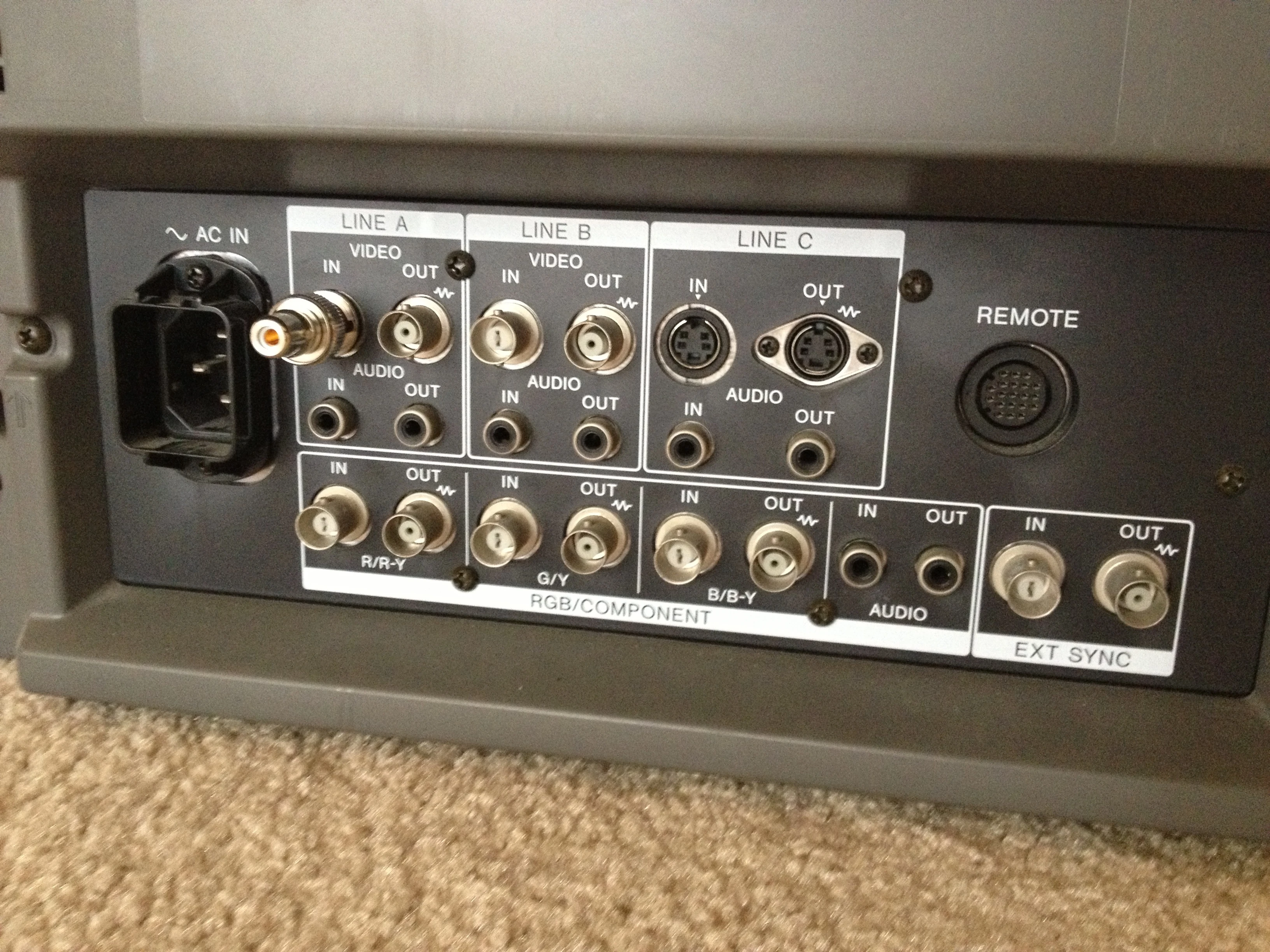
Also what is 'shadow mask' and 'aperture grille'?
I am willing to put some time and money into this, since I already put basically all of my time and money into building crazy audio setups in my bedroom and living room. I'm talking like hardly ever going out with friends or eating out and always being broke because I'm saving up for RCA cables that cost $500 >.< I think when it comes down to it, since I will pretty much only be using this monitor for 240p content, I would like a monitor that is meant for handling only 240p content, and as I understand it that means a monitor with nice thick scanlines and RGB input, yeah? Something that displays the 240p image as purely as it can be.
Last edited by RdCrestdBreegull on Sun Sep 18, 2016 9:54 am, edited 4 times in total.
-
tacoguy64
- Posts: 558
- Joined: Tue Dec 30, 2014 12:42 am
Re: Building my perfect NES/SNES/N64 setup
I got a different opinion on this.
I love the quality of a nice rgb monitor. Something like a PVM/BVM will be unmatched in sharpness, controls, reliability, color reproduction, and scanlines. To me going with a nice rgb monitor is the way to go. Though it isn't for everyone. Finding one of these monitors can be expensive nowadays, will require patience, and knowledge.
Something like the BVM20F1U is 20 inches in size which is fine for all NES, SNES, and single player N64 games. Could probably do split-screen multiplayer on it but I haven't tried it yet . Though a screen that size you will have to sit a bit closer to it. There are also lots of other PVM monitors in that size range to chose from that will provide high quality viewing as well. If you want to go bigger, your options start to run low with rgb monitors. There are of course the 24 inch and 32 inch BVMs, and PVMs that go up to 32 inches which are a bit uncommon. Then there are presentation displays which come from 27 inches all the way to 42 inches. Those are usually pretty nice because they can display multiple resolutions and they are big. Though they are just as uncommon as anything else and if you find them they will be expensive a lot of the time. These are also rare.
You can also I suppose go the consumer route which are easier and cheaper to find. A consumer tv from the 2000s will be good quality and you will be able to find them in bigger sizes. This will save you the most time, and give you the most bang for your buck. Picture quality wont be as good as a BVM/PVM but it will still be nice. You should still rgb mod your systems and get a scart to component transcoder.
For those systems there are also diffent options to go with. With N64 on a crt, I'd recommend going with the Tims rgb mod with de-blur installed. SNES you will want to go with the SNES mini with rgb installed. And for NES there's the NESRGB mod. With the NES you can have them install the original color pallete. Both N64 and SNES can be easily and cheaply modded to play imports. NES will require an adapter which aren't that expensive.
As for console mods, you will want to get an rgb modded NES. There are several different mods for it but the NESRGB mod should work good with all versions. For SNES the normal american model can ouput rgb so you will only need cables. Though the SNES mini provides you with the best results after it's been modded. And for N64 you will want to get Tims rgb mod with the de-blur firmware.
I love the quality of a nice rgb monitor. Something like a PVM/BVM will be unmatched in sharpness, controls, reliability, color reproduction, and scanlines. To me going with a nice rgb monitor is the way to go. Though it isn't for everyone. Finding one of these monitors can be expensive nowadays, will require patience, and knowledge.
Something like the BVM20F1U is 20 inches in size which is fine for all NES, SNES, and single player N64 games. Could probably do split-screen multiplayer on it but I haven't tried it yet
. Though a screen that size you will have to sit a bit closer to it. There are also lots of other PVM monitors in that size range to chose from that will provide high quality viewing as well. If you want to go bigger, your options start to run low with rgb monitors. There are of course the 24 inch and 32 inch BVMs, and PVMs that go up to 32 inches which are a bit uncommon. Then there are presentation displays which come from 27 inches all the way to 42 inches. Those are usually pretty nice because they can display multiple resolutions and they are big. Though they are just as uncommon as anything else and if you find them they will be expensive a lot of the time. These are also rare. You can also I suppose go the consumer route which are easier and cheaper to find. A consumer tv from the 2000s will be good quality and you will be able to find them in bigger sizes. This will save you the most time, and give you the most bang for your buck. Picture quality wont be as good as a BVM/PVM but it will still be nice. You should still rgb mod your systems and get a scart to component transcoder.
For those systems there are also diffent options to go with. With N64 on a crt, I'd recommend going with the Tims rgb mod with de-blur installed. SNES you will want to go with the SNES mini with rgb installed. And for NES there's the NESRGB mod. With the NES you can have them install the original color pallete. Both N64 and SNES can be easily and cheaply modded to play imports. NES will require an adapter which aren't that expensive.
As for console mods, you will want to get an rgb modded NES. There are several different mods for it but the NESRGB mod should work good with all versions. For SNES the normal american model can ouput rgb so you will only need cables. Though the SNES mini provides you with the best results after it's been modded. And for N64 you will want to get Tims rgb mod with the de-blur firmware.
-
kamiboy
- Posts: 2000
- Joined: Sat Sep 04, 2010 4:40 pm
- Location: Denmark
Re: Building my perfect NES/SNES/N64 setup
You don't lose "quality" by going to a bigger screen.
Just like every greenhorn looking to hop onboard the nice quality CRT bandwagon you are too hung up on metrics. This obsession with what is the "best" is a wild goose chase, and a result of over reliance on "expert" opinion on the very subjective opinion of what you might like best.
Instead of reading other people's impression the best thing you can do is go out there with your consoles of choice and look at some acrual CRT's for yourself, with your own eyes. Only then will you know the answer.
Just like every greenhorn looking to hop onboard the nice quality CRT bandwagon you are too hung up on metrics. This obsession with what is the "best" is a wild goose chase, and a result of over reliance on "expert" opinion on the very subjective opinion of what you might like best.
Instead of reading other people's impression the best thing you can do is go out there with your consoles of choice and look at some acrual CRT's for yourself, with your own eyes. Only then will you know the answer.
-
RdCrestdBreegull
- Posts: 66
- Joined: Sun Sep 18, 2016 12:26 am
Re: Building my perfect NES/SNES/N64 setup
So my SNS-001 Super Nintendo doesn't even need an RGB mod? So if I buy a SCART cable for it I'm good to go? If I get a BVM-20F1U with three RGB modules, get my NES and N64 modded for RGB, get SCART cables for all three systems with SCART-to-BNC converters for each... can't I just plug everything into the BVM-20F1U and be good to go?
-
tacoguy64
- Posts: 558
- Joined: Tue Dec 30, 2014 12:42 am
Re: Building my perfect NES/SNES/N64 setup
We all gotta start somewhere not all of us are experts.kamiboy wrote:You don't lose "quality" by going to a bigger screen.
Just like every greenhorn looking to hop onboard the nice quality CRT bandwagon you are too hung up on metrics. This obsession with what is the "best" is a wild goose chase, and a result of over reliance on "expert" opinion on the very subjective opinion of what you might like best.
Instead of reading other people's impression the best thing you can do is go out there with your consoles of choice and look at some acrual CRT's for yourself, with your own eyes. Only then will you know the answer.
This forum is a resource he can and should be using when it comes to this topic.
Yeah the normal SNES 001 should be able to output rgb natively though from my understanding it wasn't that good compared to the other models.RdCrestdBreegull wrote:So my SNS-001 Super Nintendo doesn't even need an RGB mod? So if I buy a SCART cable for it I'm good to go? If I get a BVM-20F1U with three RGB modules, get my NES and N64 modded for RGB, get SCART cables for all three systems with SCART-to-BNC converters for each... can't I just plug everything into the BVM-20F1U and be good to go?
And you don't need 3 seperate rgb inputs for your monitor. Just get a 3 way splitter which can be purchased at a reasonable price. You will only need to buy 1 set of bnc to rgb cables and one rgb cable for each separate system.
-
Einzelherz

- Posts: 1281
- Joined: Wed Apr 09, 2014 2:09 am
Re: Building my perfect NES/SNES/N64 setup
If I were starting from scratch again, the advice I'd give myself would be "find a local JVC D-Series tv." It's a large screen, it's high resolution, and it's cheap.
From what I've read on here it doesn't have phenomenal settings adjustments (unsure if that means color or geometry) but since my 06 mid range Philips tv manages a decent screen, I'm sure it's fine.
I would then recommend that I get the same colormunki colorimeter and calibrate the colors on the screen. Also I'd buy a SCART to YPbPr converter that's good and non adjustable and make sure it doesn't screw up the colors much after I've picked up SCART cables for all of my systems.
The monitors are nice, don't get me wrong. But we've been very spoiled by the size of HDTVs and going back to 20 inches, or less, can be difficult. IMO the only significant appeal to monitors are the color and geometry controls (if needed) and the ease of rotating the display 90°. And even then, I refuse to rotate my Sonys for fear of damaging the aperture grille.
From what I've read on here it doesn't have phenomenal settings adjustments (unsure if that means color or geometry) but since my 06 mid range Philips tv manages a decent screen, I'm sure it's fine.
I would then recommend that I get the same colormunki colorimeter and calibrate the colors on the screen. Also I'd buy a SCART to YPbPr converter that's good and non adjustable and make sure it doesn't screw up the colors much after I've picked up SCART cables for all of my systems.
The monitors are nice, don't get me wrong. But we've been very spoiled by the size of HDTVs and going back to 20 inches, or less, can be difficult. IMO the only significant appeal to monitors are the color and geometry controls (if needed) and the ease of rotating the display 90°. And even then, I refuse to rotate my Sonys for fear of damaging the aperture grille.
-
Mantis128

- Posts: 66
- Joined: Mon Apr 25, 2016 9:31 am
- Contact:
Re: Building my perfect NES/SNES/N64 setup
Can't really help since I'm still learning myself, but I will say good luck on getting your setup since I'm on the same quest as you.
One thing I'l say is that I've heard of thick RGB monitor scanlines not being everyone's cup of tea for the N64 due to it giving 3D games a "venetian blinds" look.
One thing I'l say is that I've heard of thick RGB monitor scanlines not being everyone's cup of tea for the N64 due to it giving 3D games a "venetian blinds" look.
-
orange808

- Posts: 3921
- Joined: Sat Aug 20, 2016 5:43 am
Re: Building my perfect NES/SNES/N64 setup
Get a good consumer CRT first. It won't cost you much. Mine is a 27" set.
I always preferred to save my money for more games, systems, and controllers
If buying a different setup will crunch your game budget, ask yourself if it's worth it.
I always preferred to save my money for more games, systems, and controllers
If buying a different setup will crunch your game budget, ask yourself if it's worth it.
We apologise for the inconvenience
-
Taiyaki
- Posts: 1052
- Joined: Fri Apr 04, 2014 11:31 pm
Re: Building my perfect NES/SNES/N64 setup
Either is fine. Size depends on how far you intend to sit from the tv. If you're a single player a 13 inch works alright. If you like a bit of flexibility a 20 or 24 inch would be more versatile. If you like to play from a couch 10 feet away then go with a 27 and up.RdCrestdBreegull wrote:Damn. And here I thought I was going to be saving up for RGB equipment and getting all this fancy stuff... hehe
Hmm... Damn, okay, so should I go S-video or component? Right now I'm rocking a Commodore 1702 monitor, which is great, but I definitely want something bigger. I want my new monitor to be bigger, but without being too big so it doesn't degrade picture quality. Do you guys think a 20" monitor or television would be okay as far as quality in relation to size goes? I know that in smaller monitors the quality difference of S-video or component compared with composite is hardly noticeable, so I definitely want a screen big enough to showcase the advantage of S-video or component (whichever I decide to go with).
Component sometimes will require a YUV encoder to go from scart to component for consoles that don't have component options out of the box. You can use one or several S-video switch boxes (passive types work fine) as well as component switch boxes to have multiple consoles hooked up at the same time. I didn't find the gain in quality from component worth having to go through the trouble of yuv encoders and additional scart switch boxes but many people do find it worth it.
No the mod would not change the S-video signal as far as I know. The official cables are becoming increasingly rare but the good news over the past few years there are some really good sellers on ebay and the likes that have been making hand made S-video cables and sometime composite, with gold plated components and very good shielding, arguably matching or surpassing those official cables. Again component in terms of pure quality, will always surpass S-video. What matters however is whether or not that gain is noticeable on the set you buy. If you go for a consumer crt the difference will most likely be very light (nothing like the leap from RF to composite or composite to S-video). I'd recommend just trying it for yourself and find out what you like best.RdCrestdBreegull wrote:So if I have the option of S-video or component for my NES, SNES, and N64, which should I go with? Logic would probably point me toward component since it has three separate signals for video rather than two like S-video has. Also, what will getting RGB mods (like the ones from RetroFixes mentioned above) do for my NES, SNES, and N64? As far as I understand, I need the RGB mods in order to use component cables, but are the RGB mods needed to use S-video? I know that some SNESs and N64s can use S-video with an official Nintendo S-video cable, but does getting the RGB mod make the S-video signal even better? RetroFixes has been vary reliable for me in the past and does excellent work.
No you can only have one of those boards hooked up (and it can only take 1 rgb connection hooked up at a time). The additional slots are only for optional boards unfortunately. That first board has essential video components required to use the unit, and is not an optional add on board. You have to go the route of scart switch boxes in that case. For some reason all of these (including the fantastic one superg makes here) shift the image horizontally one side or the other but the BVM units are great for helping in fixing this as you can register different channels with horizontal shift changes to balance the picture for each console individually (this does not happen with s-video or component switch boxes btw).RdCrestdBreegull wrote:And if I do decide to go the pure RGB route... If I were to get a Sony BVM-20F1U monitor, wouldn't it be possible to either get one with three separate RGB inputs or get one with two and then buy a third RGB module? This way, wouldn't I be able to skip the SCART switchbox altogether and just plug everything straight into the monitor?
These sets are actually smaller than they appear. A 14 inch is really a 13 inch I believe and the 20 inch I measured is actually 19 inches. Also because they are semi curved tv's the viewable picture will be a bit lesser than that (for 20, perhaps 18 inch?). If you go for consumer sets of the flat variety (the later tubes) in the same size, the 20 inch sets were actually 21 inch and you get the full surface viewable. I've compared both and the screens are noticeably bigger than the pro 20 inch sets.RdCrestdBreegull wrote:There is a Sony PVM-14M4U monitor on craigslist in my immediate area with an asking price of $250. Based on this picture, it seems like it would be possible to have two systems hooked up via composite, one via S-video, and one via either component or RGB at the same time (choosing component or RGB using a button on the front of the monitor). Is this true? And how would this PVM-14M4U compare to my Commodore 1702? Although I will probably be wanting at least a 20" monitor if I'm going to upgrade.
http://vignette2.wikia.nocookie.net/son ... 1011061524
There should be no disadvantage to getting smaller sets aside from sometimes having less inputs in the back. The only real disadvantage are that better models generally didn't come in smaller sizes, and sometimes not even in mid sizes. The FV sets mostly did come in mid sizes (20 and 24), with some exceptions such as the FV310 which started at 27 inch.
They are the two most common varieties of CRT's, the technology of each has advantages and downsides but I think this is best researched on the internet for a better visual explanation. Generally the very curved tubes you see will pretty much always be shadow masks and the very much flatter screens will almost always be aperture grille tubes.RdCrestdBreegull wrote:Also what is 'shadow mask' and 'aperture grille'?
-
kamiboy
- Posts: 2000
- Joined: Sat Sep 04, 2010 4:40 pm
- Location: Denmark
Re: Building my perfect NES/SNES/N64 setup
Personally I prefer to justify spending money on things based on how useful they are to me. Every game and system I play will be through my display and sound setup. In contrast a single game is only good for a few playthroughs at best. Spending money on a solid display/speaker setup is a very worthy investment in my eyes as it will enhance the experience of every game and system played through it.orange808 wrote:Get a good consumer CRT first. It won't cost you much. Mine is a 27" set.
I always preferred to save my money for more games, systems, and controllers
If buying a different setup will crunch your game budget, ask yourself if it's worth it.
-
mvsfan
- Posts: 1209
- Joined: Sat Oct 06, 2012 12:24 am
Re: Building my perfect NES/SNES/N64 setup
JVC AV36S33 is a nice consumer set with component inputs. I have one. Its 800 TVL and I think it looks great.
As someone who also owns a PVM-14N6U (500 TVL, I prefer the JVC because of the screen size. not only that but because the JVC is 800 TVL, these two displays look almost identical to me because of screen sizes.
If i had a pro monitor that was higher TVL than 500, the pro monitor would look sharper because of the small screen size.
So what i am saying, i agree, go with a good consumer set. Because tv screen size is way up there now, its hard to get used to a 20" monitor i think.
As someone who also owns a PVM-14N6U (500 TVL, I prefer the JVC because of the screen size. not only that but because the JVC is 800 TVL, these two displays look almost identical to me because of screen sizes.
If i had a pro monitor that was higher TVL than 500, the pro monitor would look sharper because of the small screen size.
So what i am saying, i agree, go with a good consumer set. Because tv screen size is way up there now, its hard to get used to a 20" monitor i think.
-
Taiyaki
- Posts: 1052
- Joined: Fri Apr 04, 2014 11:31 pm
Re: Building my perfect NES/SNES/N64 setup
Especially because the pro monitors are much smaller than what they list as. Have you measured yours? I've put a consumer Trinitron 20 inch (which measured at 21) next to my bvm (which measures as a 19 but curved) and the screen size difference was much more pronounced than you'd expect. People don't realize the pro monitors are mostly on the smaller side. The 20 inch monitors do NOT really feel like mid size monitors imo.mvsfan wrote:Because tv screen size is way up there now, its hard to get used to a 20" monitor i think.
-
tjstogy
- Posts: 341
- Joined: Tue Sep 01, 2015 1:27 am
- Location: New York
Re: Building my perfect NES/SNES/N64 setup
Yeah, I think it depends on a few things. For instance Playing split screen goldeneye on a 20" pvm is annoying. Plus the pvm is very deep. If you want a larger monitor it's the BVM series which is insanely large and stupid expensive. You can get a sweet consumer grade tv, much larger screen, much less deep, way more available and much less expensive. I would look for a 2000's Sony that does not do HD, but still has component inputs. That way you can still get RGB from your consoles. If you decide you want the pvm after that instead, you're 99% there already.
-
neorichieb1971
- Posts: 8024
- Joined: Wed Jan 26, 2005 1:28 am
- Location: Bedford, UK
- Contact:
Re: Building my perfect NES/SNES/N64 setup
In my humble opinion buy the latest greatest CRT that supports component. Buy HDretrovision component cables for the Sega and Nintendo machines.
This means there is unlikely to be anything wrong with the TV. The cables are plug and play which means you'll spend more time playing than twiddling. You'll get a very good picture quality and although some might argue its not the holy grail of RGB you will certainly save a few hundred dollars. You may lose 10-15% tops on picture quality but you;ll not have to be worrying about firmwares, millions of settings, importing expensive RGB output boxes and certainly not need to worry about Japanese language.
The SNS-001 is RGB compliant so very cheap to get the best out of it. Reviewers of the HDretrovision cables state that no matter what model of the SNES you have the quality of PQ from the component cables is the same. How that works I do not know, but its probably a good thing for you.
I've got 2 astro city cabinets in my garage and whilst the PQ is RGB in all its glory I Cannot understand trying to replicate that on 25 year old monitors that have seen better days. There are so many people on this forum and other forums that have spent more on their RGB setup than their cars and still they talk about RGB like its causing depression. Don't be that man, don't fuel this sport, be happy.
This means there is unlikely to be anything wrong with the TV. The cables are plug and play which means you'll spend more time playing than twiddling. You'll get a very good picture quality and although some might argue its not the holy grail of RGB you will certainly save a few hundred dollars. You may lose 10-15% tops on picture quality but you;ll not have to be worrying about firmwares, millions of settings, importing expensive RGB output boxes and certainly not need to worry about Japanese language.
The SNS-001 is RGB compliant so very cheap to get the best out of it. Reviewers of the HDretrovision cables state that no matter what model of the SNES you have the quality of PQ from the component cables is the same. How that works I do not know, but its probably a good thing for you.
I've got 2 astro city cabinets in my garage and whilst the PQ is RGB in all its glory I Cannot understand trying to replicate that on 25 year old monitors that have seen better days. There are so many people on this forum and other forums that have spent more on their RGB setup than their cars and still they talk about RGB like its causing depression. Don't be that man, don't fuel this sport, be happy.
This industry has become 2 dimensional as it transcended into a 3D world.
-
RdCrestdBreegull
- Posts: 66
- Joined: Sun Sep 18, 2016 12:26 am
Re: Building my perfect NES/SNES/N64 setup
I have questions regarding everyone's replies, but here's a quick question--There are two PVMs available locally for me right now. Which of these is a better choice? PVM-1343MD or PVM-14M4U? These are 13"/14" monitors that will hold me over and give me a taste until I decide to go with a larger and potentially more expensive display.
-
Guspaz

- Posts: 3242
- Joined: Tue Oct 06, 2015 7:37 pm
- Location: Montréal, Canada
Re: Building my perfect NES/SNES/N64 setup
If they're both in good condition, the PVM-14M4U is roughly a decade newer and much higher resolution.
I believe the 1343 is from the late 1980s or early 1990s, while the 14M4U should be from the late 90s to early 00s.
The 14M4U is an 800 TVL model, which is rather high for a 14" PVM (my PVM 14L2 is 600TVL), but I can't find info on the 1343MD. I think it's 450 TVL or 600 TVL, but I'm guessing.
Personally, for 14", I'm quite happy at 600 TVL, and I'm not sure that I'd want to go higher (which makes the image even sharper).
I believe the 1343 is from the late 1980s or early 1990s, while the 14M4U should be from the late 90s to early 00s.
The 14M4U is an 800 TVL model, which is rather high for a 14" PVM (my PVM 14L2 is 600TVL), but I can't find info on the 1343MD. I think it's 450 TVL or 600 TVL, but I'm guessing.
Personally, for 14", I'm quite happy at 600 TVL, and I'm not sure that I'd want to go higher (which makes the image even sharper).
-
Einzelherz
- Posts: 1281
- Joined: Wed Apr 09, 2014 2:09 am
Re: Building my perfect NES/SNES/N64 setup
14M4 all the way. 13" 800TVL is pretty cool.
-
RdCrestdBreegull
- Posts: 66
- Joined: Sun Sep 18, 2016 12:26 am
Re: Building my perfect NES/SNES/N64 setup
So it seems like the 14M4U has two composite video inputs, one S-video input, and one RGB input. Can I have, for example, my NES connected via composite, SNES via S-video, and N64 via RGB all at the same time? Does the monitor have input selection?
-
Guspaz
- Posts: 3242
- Joined: Tue Oct 06, 2015 7:37 pm
- Location: Montréal, Canada
Re: Building my perfect NES/SNES/N64 setup
On that monitor, yes. On some PVMs, one of the composite and one of the s-video inputs are combined on the same input selection, but that's not the case on the 14M4U. So there are four input selections available in total.
That said, it doesn't make sense to connect a SNES to this monitor using S-Video, since the SNES supports native RGB output.
That said, it doesn't make sense to connect a SNES to this monitor using S-Video, since the SNES supports native RGB output.
-
RdCrestdBreegull
- Posts: 66
- Joined: Sun Sep 18, 2016 12:26 am
Re: Building my perfect NES/SNES/N64 setup
If you had to assign composite, S-video, and RGB to the NES, SNES, and N64, which would you assign to which? I'm planning on getting an RGB mod for my N64 when I send it in to get cleaned anyway.Guspaz wrote:That said, it doesn't make sense to connect a SNES to this monitor using S-Video, since the SNES supports native RGB output.
-
Guspaz
- Posts: 3242
- Joined: Tue Oct 06, 2015 7:37 pm
- Location: Montréal, Canada
Re: Building my perfect NES/SNES/N64 setup
I'd get a switch, or manually switch the SCART cable between the two RGB consoles.
I think that the S-Video -> RGB improvement is bigger on the SNES than the N64 due to the very soft image of the N64 (unless you use the N64RGB mod, and even then, I think it benefits the SNES more). So if I had to pick just one for each input, it would be:
NES: Composite
SNES: RGB
N64: S-Video
But again, in real life I'd use RGB for all three.
I think that the S-Video -> RGB improvement is bigger on the SNES than the N64 due to the very soft image of the N64 (unless you use the N64RGB mod, and even then, I think it benefits the SNES more). So if I had to pick just one for each input, it would be:
NES: Composite
SNES: RGB
N64: S-Video
But again, in real life I'd use RGB for all three.
-
RdCrestdBreegull
- Posts: 66
- Joined: Sun Sep 18, 2016 12:26 am
Re: Building my perfect NES/SNES/N64 setup
I was thinking about getting this mod from Retrofixes (with added bonuses) for my SNS-001. Good choice? Should I wait to get a SNS-101 model, or would getting this mod for my SNS-001 right now be nice?
And what about this RGB mod for my N64? Anything wrong with this?
And what about this RGB mod for my N64? Anything wrong with this?
-
Guspaz
- Posts: 3242
- Joined: Tue Oct 06, 2015 7:37 pm
- Location: Montréal, Canada
Re: Building my perfect NES/SNES/N64 setup
I'm not familiar enough with that mod to know what impact it would have on the RGB image quality.
That RGB mod is the very basic one, and it only works on a few specific models. I'm not sure that it would have all that much of an improvement in quality over s-video as compared to the N64RGB or UltraHDMI with deblur, but I'll admit that I've not seen any of the N64 stuff in person.
That RGB mod is the very basic one, and it only works on a few specific models. I'm not sure that it would have all that much of an improvement in quality over s-video as compared to the N64RGB or UltraHDMI with deblur, but I'll admit that I've not seen any of the N64 stuff in person.
-
RdCrestdBreegull
- Posts: 66
- Joined: Sun Sep 18, 2016 12:26 am
Re: Building my perfect NES/SNES/N64 setup
I have an N64 with a serial starting with NS1, so this mod would work for me. You don't think this mod is N64RGB? What would be a place that offers a better RGB mod for my NS1 N64?Guspaz wrote:That RGB mod is the very basic one, and it only works on a few specific models. I'm not sure that it would have all that much of an improvement in quality over s-video as compared to the N64RGB or UltraHDMI with deblur, but I'll admit that I've not seen any of the N64 stuff in person.
-
Guspaz
- Posts: 3242
- Joined: Tue Oct 06, 2015 7:37 pm
- Location: Montréal, Canada
Re: Building my perfect NES/SNES/N64 setup
The RetroFixes mod is definitely not an N64RGB, because he specifies that it only works on certain models: the N64RGB mod works on all models, it's the "rgb enable" type mod that works on the certain models.
I'm not sure who does the N64RGB install off the top of my head. I'd try asking Voultar, his prices are good and he has a good rep.
I'm not sure who does the N64RGB install off the top of my head. I'd try asking Voultar, his prices are good and he has a good rep.
-
RdCrestdBreegull
- Posts: 66
- Joined: Sun Sep 18, 2016 12:26 am
Re: Building my perfect NES/SNES/N64 setup
Alright, so I picked up a PVM-14M4U locally for $250. Apparently it only has around 500 hours on it, which sounds insanely low to me. An older guy who worked for PBS and would create images in Photoshop on his old Mac and then use the monitor for reference before submitting his work for broadcast. I got really lucky because he actually had promised it to someone working at Apple, and he got mixed up and thought I was the Apple guy and he told me to come to his house. He said it was all a mixup, but since I got there first I could take it. He was very firm on the $250.
Been messing around with my SNES and N64 hooked up to it with S-Video. The SNES looks very solid. N64 looks great. Also have noticed that some of my N64 games are 480i, while most are in 240p (seems like maybe 9 out of my 35 games are 480i). Is playing 480i games ideal for this monitor? Can't wait to get a Nintendo SCART cable with an RGB BNC converter!
Been messing around with my SNES and N64 hooked up to it with S-Video. The SNES looks very solid. N64 looks great. Also have noticed that some of my N64 games are 480i, while most are in 240p (seems like maybe 9 out of my 35 games are 480i). Is playing 480i games ideal for this monitor? Can't wait to get a Nintendo SCART cable with an RGB BNC converter!