Nes rgb with composite colors?
-
leonk
- Posts: 1098
- Joined: Sun Mar 13, 2011 9:29 pm
- Location: Toronto, Canada
Re: Nes rgb with composite colors?
what is this .pal file? How can it be used / examined?
-
FBX

- Posts: 2349
- Joined: Wed Feb 18, 2015 10:18 am
- Location: DFW area, Texas
- Contact:
Re: Nes rgb with composite colors?
Some NES emulators support them, like Nestopia for example.leonk wrote:what is this .pal file? How can it be used / examined?
-
thebeautifulones

- Posts: 41
- Joined: Thu Jul 03, 2014 6:03 am
Re: Nes rgb with composite colors?
It looks perfect.FBX wrote:Spent a couple hours getting everything to my liking. Here's new 'accuracy' palette:
http://www.firebrandx.com/downloads/fbx ... alette.zip
It's an amalgam of some of my eyeball tweaks combined with my direct-capture hues, as well as the top-end values from the 'natural' palette (which are actually quite good on that end). I tested all the Mega Man games, Castlevanias, Zeldas, SMBs, etc., and everything looked kosher.
-
The_Atomik_Punk!
- Posts: 110
- Joined: Mon Mar 10, 2014 3:47 pm
- Location: Toronto, Canada
Re: Nes rgb with composite colors?
Holy smokes this is a MASSIVE improvement FBX  . Anyone that wants to see some quick and drastic upgrades with this custom palette should boot up Nestopia and load Castlevania II Simons Quest (check out the difference in the title screen). Same thing with Faxanadu; check out the intro cinematic of the protagonist walking down the road, the sky is actually the proper shade of blue! Finally, go down the first pipe in the original Super Mario Bros, and look at the bricks. A lot of the darker games like Batman or Vice: Project Doom show better shading on areas with background layers (check out the improvement in Mega Man 2 Heat Man's level background).
To adress the OP's original observation, with this custom palette from FBX, robot masters in Megaman 2 stage select screen are no longer pink, but the correct colours.
Two quick comments FBX. Can you please do me a favour and double check the reds/oranges, namely with Bionic Commando level 5, and the opening level in Rygar? In addition, I think the opening stage in Metroid may look a tad too purple (appears more blue to me on original hardware), as well as the sprite of Ryu Hyubasa in Ninja Gaiden looking a little too purple (once again seems closer to blue on stock composite to me).
In closing, you're the dude FBX; now how in the heck can I get your custom palette into my RGB modded AV Famicom- I need this in my life stat!
. Anyone that wants to see some quick and drastic upgrades with this custom palette should boot up Nestopia and load Castlevania II Simons Quest (check out the difference in the title screen). Same thing with Faxanadu; check out the intro cinematic of the protagonist walking down the road, the sky is actually the proper shade of blue! Finally, go down the first pipe in the original Super Mario Bros, and look at the bricks. A lot of the darker games like Batman or Vice: Project Doom show better shading on areas with background layers (check out the improvement in Mega Man 2 Heat Man's level background).To adress the OP's original observation, with this custom palette from FBX, robot masters in Megaman 2 stage select screen are no longer pink, but the correct colours.
Two quick comments FBX. Can you please do me a favour and double check the reds/oranges, namely with Bionic Commando level 5, and the opening level in Rygar? In addition, I think the opening stage in Metroid may look a tad too purple (appears more blue to me on original hardware), as well as the sprite of Ryu Hyubasa in Ninja Gaiden looking a little too purple (once again seems closer to blue on stock composite to me).
In closing, you're the dude FBX; now how in the heck can I get your custom palette into my RGB modded AV Famicom- I need this in my life stat!
-
Skips
- Posts: 404
- Joined: Tue Oct 22, 2013 3:03 am
Re: Nes rgb with composite colors?
I do not believe Tim has added the ability to add or replace palettes.
I am no longer taking free or paid modding projects, please do not contact me asking for my services. Thanks  .
.
.-
CkRtech

- Posts: 668
- Joined: Mon Aug 27, 2012 9:30 pm
- Location: Seattle, WA
Re: Nes rgb with composite colors?
After my earlier post that wondered if this is something that can be updated via firmware, I sent Tim an email. If it is possible, perhaps the final palette here can be submitted to Tim for incorporation, and he can link us to the update.
Perhaps this one could replace "Garish?"
Perhaps this one could replace "Garish?"
-
FBX
- Posts: 2349
- Joined: Wed Feb 18, 2015 10:18 am
- Location: DFW area, Texas
- Contact:
Re: Nes rgb with composite colors?
I did test Bionic Commando and it looked correct from my end (though only through the first level). I'll double check again and test Rygar as well to see if I spot anything out of place.The_Atomik_Punk! wrote:
Two quick comments FBX. Can you please do me a favour and double check the reds/oranges, namely with Bionic Commando level 5, and the opening level in Rygar? In addition, I think the opening stage in Metroid may look a tad too purple (appears more blue to me on original hardware), as well as the sprite of Ryu Hyubasa in Ninja Gaiden looking a little too purple (once again seems closer to blue on stock composite to me).
On Metroid and Ninja Gaiden, both those entries were part of the "some displays don't detect the intended purple tinge" issue I mentioned earlier. For example, my LCD doesn't pick up the purple tinge and displays them as straight blue like yours does, but my Framemeister and my capture card both pick up the intended color. Now how we know these particular colors should have a purple tinge is the Mega Man 5 intro. On displays that don't pick up the color correctly, Protoman in that intro will appear the same blue color as the background robots, when it was intended that he stands out from them due to his purple tinge.
-
bobrocks95

- Posts: 3663
- Joined: Mon Apr 30, 2012 2:27 am
- Location: Kentucky
Re: Nes rgb with composite colors?
Where did Tim pull the original "Natural" palette from, an emulator? Where did the emu authors pull the palette from? Curious how the values came to be, and I'd assume it's more than somebody making them up out of thin air.CkRtech wrote:After my earlier post that wondered if this is something that can be updated via firmware, I sent Tim an email. If it is possible, perhaps the final palette here can be submitted to Tim for incorporation, and he can link us to the update.
Perhaps this one could replace "Garish?"
PS1 Disc-Based Game ID BIOS patch for MemCard Pro and SD2PSX automatic VMC switching.
-
FBX
- Posts: 2349
- Joined: Wed Feb 18, 2015 10:18 am
- Location: DFW area, Texas
- Contact:
Re: Nes rgb with composite colors?
It comes from the "YUV" palette found in Nestopia.bobrocks95 wrote:Where did Tim pull the original "Natural" palette from, an emulator? Where did the emu authors pull the palette from? Curious how the values came to be, and I'd assume it's more than somebody making them up out of thin air.CkRtech wrote:After my earlier post that wondered if this is something that can be updated via firmware, I sent Tim an email. If it is possible, perhaps the final palette here can be submitted to Tim for incorporation, and he can link us to the update.
Perhaps this one could replace "Garish?"
Anyway, I re-uploaded the accuracy palette with a slight reduction in the purple tinge. There's still just enough to allow Protoman to stand out as he should, but not so much as to make some of the graphics in Metroid too purple. This is the best compromise between 'intended' and 'what everyone remembers'.
Rygar's sunset looked spot-on when I loaded it up on the real hardware just now, and level 5 in Bionic Commando looked spot-on as well. I did add a few extra points in the mountain highlight color, but it's nothing notable.
-
kamiboy
- Posts: 2000
- Joined: Sat Sep 04, 2010 4:40 pm
- Location: Denmark
Re: Nes rgb with composite colors?
Shouldn't the palette that Nintendo uses in their Virtual console in-house made emulators no be considered the official correct RGB palette? Why is that not used for "Natural" rather than the palette from some third party emulator?
I've always wondered about that.
I've always wondered about that.
-
FBX
- Posts: 2349
- Joined: Wed Feb 18, 2015 10:18 am
- Location: DFW area, Texas
- Contact:
Re: Nes rgb with composite colors?
kamiboy wrote:Shouldn't the palette that Nintendo uses in their Virtual console in-house made emulators no be considered the official correct RGB palette? Why is that not used for "Natural" rather than the palette from some third party emulator?
I've always wondered about that.
Dare I say it, but I seriously doubt Nintendo put any work into making an accurate palette. In fact, it wouldn't surprise me if it turned out they just used an emulator palette as well.
-
kamiboy
- Posts: 2000
- Joined: Sat Sep 04, 2010 4:40 pm
- Location: Denmark
Re: Nes rgb with composite colors?
I doubt Nintendo half-assed it. If anyone they have unique access to data specs and development documents regarding the Famicom. If anyone was equipped to provide a definitive palette it is them.
-
Guspaz

- Posts: 3242
- Joined: Tue Oct 06, 2015 7:37 pm
- Location: Montréal, Canada
Re: Nes rgb with composite colors?
The NES emulation on the virtual console is very much half-assed. The image is super dark and very blurry. My Life in Gaming did some comparisons showing how laughably bad it is. This applies specifically to the NES: other virtual console emulators were done by different companies, and some of them actually cared.
-
Skips
- Posts: 404
- Joined: Tue Oct 22, 2013 3:03 am
Re: Nes rgb with composite colors?
The colors on the virtual console crap are not correct either. Nintendo half assed it because most people buying that stuff really don't care or won't even notice. A good example of their half assing VC stuff is the SNES games. Some things in Super Mario World are flat out the wrong color (look at the purple pipes in the first stage).
I am no longer taking free or paid modding projects, please do not contact me asking for my services. Thanks .
.-
The_Atomik_Punk!
- Posts: 110
- Joined: Mon Mar 10, 2014 3:47 pm
- Location: Toronto, Canada
Re: Nes rgb with composite colors?
Make no mistake kamiboy, Nintendo most certainly half-assed their Virtual Console releases (as others have illustrated); do not depend on them as a benchmark for colour/hue accuracy (or for anything these days, sadly), only original hardware through composite should be used as the standard IMO.
FBX, where can I download your revised "accuracy palette" (is that what you're going to call it?)? I looked at your previous post where you linked the original file, but your post doesn't appear to be edited.
FBX, where can I download your revised "accuracy palette" (is that what you're going to call it?)? I looked at your previous post where you linked the original file, but your post doesn't appear to be edited.
-
FBX
- Posts: 2349
- Joined: Wed Feb 18, 2015 10:18 am
- Location: DFW area, Texas
- Contact:
Re: Nes rgb with composite colors?
It's the same link and same name file. I didn't want to start doing a "final 2.0" type thing. This was quick one time only thing. Just click on that same link and you'll download the revised version.The_Atomik_Punk! wrote:
FBX, where can I download your revised "accuracy palette" (is that what you're going to call it?)? I looked at your previous post where you linked the original file, but your post doesn't appear to be edited.
-
RGB32E

- Posts: 1400
- Joined: Thu Nov 05, 2009 12:50 am
Re: Nes rgb with composite colors?
"Never The Same Color" composite video as a standard reference point?! That's quite the contradiction you've got there.The_Atomik_Punk! wrote:...depend on them as a benchmark for colour/hue accuracy (or for anything these days, sadly), only original hardware through composite should be used as the standard IMO.

-
Guspaz
- Posts: 3242
- Joined: Tue Oct 06, 2015 7:37 pm
- Location: Montréal, Canada
Re: Nes rgb with composite colors?
To be fair, there's that work on the 240p test kit for the NES going on, which is supposed to include SMPTE colour bars, which can be used to calibrate the display, mitigating the problems of Never Twice the Same Colour
-
Josh128

- Posts: 2351
- Joined: Thu Jan 16, 2014 9:01 am
Re: Nes rgb with composite colors?
Can you truthfully say that though? If you fire up the SMB cartridge on the same set via composite 25 times, are you saying it wont look the same each and every time? Or do you mean that each NES will look different?
-
RGB32E
- Posts: 1400
- Joined: Thu Nov 05, 2009 12:50 am
Re: Nes rgb with composite colors?
Sure. I get that a few folks want a tweaked Natural palette, just mentioning that it's somewhat of a dubious pursuit. 
It means that every TVs decoder will do something different.Josh128 wrote:Can you truthfully say that though? If you fire up the SMB cartridge on the same set via composite 25 times, are you saying it wont look the same each and every time? Or do you mean that each NES will look different?
Last edited by RGB32E on Wed Nov 25, 2015 9:31 pm, edited 1 time in total.
-
Smashbro29
- Posts: 532
- Joined: Thu Dec 15, 2011 2:46 am
Re: Nes rgb with composite colors?
Kind of a shame that natural isn't perfect, seems like if they fix that blue leaning thing it'll be perfect and good enough to replace the natural profile that's installed now.
-
bobrocks95
- Posts: 3663
- Joined: Mon Apr 30, 2012 2:27 am
- Location: Kentucky
Re: Nes rgb with composite colors?
I posted about this on the last page and nobody seemed to care...RGB32E wrote:Sure. I get that a few folks want a tweaked Natural palette, just mentioning that it's somewhat of a dubious pursuit.
It means that every TVs decoder will do something different.Josh128 wrote:Can you truthfully say that though? If you fire up the SMB cartridge on the same set via composite 25 times, are you saying it wont look the same each and every time? Or do you mean that each NES will look different?
Also another personal favorite:
Not
Tested
Since
Christ
PS1 Disc-Based Game ID BIOS patch for MemCard Pro and SD2PSX automatic VMC switching.
-
kamiboy
- Posts: 2000
- Joined: Sat Sep 04, 2010 4:40 pm
- Location: Denmark
Re: Nes rgb with composite colors?
Seems there are various sides to this. Firstly, I assume, back in the early 80's when Nintendo's engineers were designing the Famicom hardware they had to have decided and set in stone the RGB values of the hardware palette at an early phase. These values must have been noted in some document somewhere and at some point made it into various development documents and tools used by game developers when making graphics.
These RGB values were also no doubt used by the hardware designers who made the colour encoder of the Famicom PPU. Now, I do not pretend to understand how said PPU works, but I do know that it does not work with RGB values internally. Rather it generates a composite colour signal directly from software colour index identifiers.
I can guess that the documented RGB colour values could not be translated directly to whatever composite signal the PPU was wired to generate, so the end result was an approximation made by the PPU hardware designer.
There is no way of knowing whether the graphics of any game was drawn solely based on the documented RGB values, or was tweaked based on the look of the actual composite output of the unfinished game running on a regular TV.
As such, in my opinion, there is no definitive true colours when it comes to famicom games. Especially not on the viewable composite end since so many factors influence it.
Long story short, Natural looks fine to me, so I am not going to worry about it.
These RGB values were also no doubt used by the hardware designers who made the colour encoder of the Famicom PPU. Now, I do not pretend to understand how said PPU works, but I do know that it does not work with RGB values internally. Rather it generates a composite colour signal directly from software colour index identifiers.
I can guess that the documented RGB colour values could not be translated directly to whatever composite signal the PPU was wired to generate, so the end result was an approximation made by the PPU hardware designer.
There is no way of knowing whether the graphics of any game was drawn solely based on the documented RGB values, or was tweaked based on the look of the actual composite output of the unfinished game running on a regular TV.
As such, in my opinion, there is no definitive true colours when it comes to famicom games. Especially not on the viewable composite end since so many factors influence it.
Long story short, Natural looks fine to me, so I am not going to worry about it.
-
Guspaz
- Posts: 3242
- Joined: Tue Oct 06, 2015 7:37 pm
- Location: Montréal, Canada
Re: Nes rgb with composite colors?
The Famicom does not support composite video, so the appearance of colours on games via composite output would never have been a concern.
-
The_Atomik_Punk!
- Posts: 110
- Joined: Mon Mar 10, 2014 3:47 pm
- Location: Toronto, Canada
Re: Nes rgb with composite colors?
Got it. I'm actually amazed at how good your palette looks (the small tweaks you made since make it 100% in line with my personal tastes); my only question now is how can one go about getting this into a preexisting NESRGB kit already installed? Does anyone know if Tim is receptive in figuring out a solution?FBX wrote:It's the same link and same name file. I didn't want to start doing a "final 2.0" type thing. This was quick one time only thing. Just click on that same link and you'll download the revised version.The_Atomik_Punk! wrote:
FBX, where can I download your revised "accuracy palette" (is that what you're going to call it?)? I looked at your previous post where you linked the original file, but your post doesn't appear to be edited.
-
viletim
- Posts: 565
- Joined: Mon Aug 07, 2006 6:44 am
- Location: Sydney, Australia
- Contact:
Re: Nes rgb with composite colors?
Here's a diagram from the PPU programming docs which explains how the colour works.
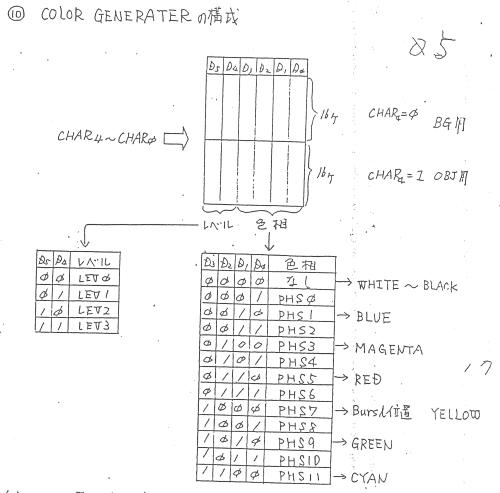
There are 13 colours to choose from (12 different phases of chroma + 1 with chroma off) with four luma values for each one. It's the same as other graphics processors that generate the colour directly (Atari 2600, 7800). You give it a number, it gives you a colour. There's no RGB involved on the programming side. The only way to see exactly what colour you get is to plug in the TV and have a look!
The sources of error for the colour reproduction are:
[*] There's error in the PPU's luma DAC. Different PPUs will output slightly different colour intensities. The colours themselves will have no error as they are from an accurate crystal clock source.
[*] Differences between countries TV standards. I haven't investigated in detail, but there are certainly some differences between the Japanese, American, and European TV standards which would contribute to the colours looking a bit different on TV set which is set up for receiving regional TV broadcasts.
[*] Error in the colour decoding. This is the greatest source of error. Colour encoding is lossy not always converted to RGB consistently by the TV set. It's important to note that the game programmer in 1985 was more likely to be using a portable TV for reference than a calibrated studio monitor.
There are three palettes included with the NESRGB. The Natural palette is the Nestopia YUV palette. It seems to be a calculated palette (based on the NTSC standard) and the colours follow the luma/chroma rules of the PPU. This is the theoretically accurate palette.
The Improved palette is from the FCEUX emulator. Each colour is hand picked. It's not very accurate in that it doesn't strictly follow the way the PPU works internally. Some games look better with this palette, others a bit worse.
The Garish palette is also from Nestopia, but this time it's a copy of the Playchoice RGB palette. It used a crude DAC instead of a phase selector and has some quite different colours as a result. This is what RGB mods with a Playchoice PPU looked like.
The three palettes all have good reasons for being there. They are also all different enough to each other that it's actually worthwhile to fit a switch and change between them. This is why I don't want to replace the Playchoice palette with another one which lies somewhere between the Natural and Impoved selections. Now all the choices pretty much look the same. It's boring, so why even bother fitting a switch at all?
I know some games look better with modifications to the palettes. Not all games have well chosen colours to begin with. The danger here is that for every game you improve, you make another look a bit off. Especially if you do it by eye and don't match the luma value with other colours in the luma range.
In the past I have made special builds of the software for people who have asked for NESRGB boards with their own palettes included. If it is so important that you create your own palette, then fine. But I don't want to do this on a regular basis.
Between the development documents and patents, there's little mystery about the way the PPU colour selection works. It's easy to find the information now. But from what I have read from developer interviews of the era, the documentation available was, at best, only what you see in the diagram above. Many developers had less that that to work with.
There are 13 colours to choose from (12 different phases of chroma + 1 with chroma off) with four luma values for each one. It's the same as other graphics processors that generate the colour directly (Atari 2600, 7800). You give it a number, it gives you a colour. There's no RGB involved on the programming side. The only way to see exactly what colour you get is to plug in the TV and have a look!
The sources of error for the colour reproduction are:
[*] There's error in the PPU's luma DAC. Different PPUs will output slightly different colour intensities. The colours themselves will have no error as they are from an accurate crystal clock source.
[*] Differences between countries TV standards. I haven't investigated in detail, but there are certainly some differences between the Japanese, American, and European TV standards which would contribute to the colours looking a bit different on TV set which is set up for receiving regional TV broadcasts.
[*] Error in the colour decoding. This is the greatest source of error. Colour encoding is lossy not always converted to RGB consistently by the TV set. It's important to note that the game programmer in 1985 was more likely to be using a portable TV for reference than a calibrated studio monitor.
There are three palettes included with the NESRGB. The Natural palette is the Nestopia YUV palette. It seems to be a calculated palette (based on the NTSC standard) and the colours follow the luma/chroma rules of the PPU. This is the theoretically accurate palette.
The Improved palette is from the FCEUX emulator. Each colour is hand picked. It's not very accurate in that it doesn't strictly follow the way the PPU works internally. Some games look better with this palette, others a bit worse.
The Garish palette is also from Nestopia, but this time it's a copy of the Playchoice RGB palette. It used a crude DAC instead of a phase selector and has some quite different colours as a result. This is what RGB mods with a Playchoice PPU looked like.
The three palettes all have good reasons for being there. They are also all different enough to each other that it's actually worthwhile to fit a switch and change between them. This is why I don't want to replace the Playchoice palette with another one which lies somewhere between the Natural and Impoved selections. Now all the choices pretty much look the same. It's boring, so why even bother fitting a switch at all?
I know some games look better with modifications to the palettes. Not all games have well chosen colours to begin with. The danger here is that for every game you improve, you make another look a bit off. Especially if you do it by eye and don't match the luma value with other colours in the luma range.
In the past I have made special builds of the software for people who have asked for NESRGB boards with their own palettes included. If it is so important that you create your own palette, then fine. But I don't want to do this on a regular basis.
The Famicom hardware was designed by Ricoh, not Nintendo. Most game console chip set development is outsourced because it's such a specialised field.kamiboy wrote:Seems there are various sides to this. Firstly, I assume, back in the early 80's when Nintendo's engineers were designing the Famicom hardware they had to have decided and set in stone the RGB values of the hardware palette at an early phase. These values must have been noted in some document somewhere and at some point made it into various development documents and tools used by game developers when making graphics.
Between the development documents and patents, there's little mystery about the way the PPU colour selection works. It's easy to find the information now. But from what I have read from developer interviews of the era, the documentation available was, at best, only what you see in the diagram above. Many developers had less that that to work with.
Video over RF is just Composite video and audio modulated on a TV transmission band. The video from the Famicom will be demodulated to composite video at some point inside the TV set.Guspaz wrote:The Famicom does not support composite video, so the appearance of colours on games via composite output would never have been a concern.
-
Josh128
- Posts: 2351
- Joined: Thu Jan 16, 2014 9:01 am
Re: Nes rgb with composite colors?
^^
The master weighs in!
Thanks for the in depth response Tim, very interesting.
The master weighs in!
Thanks for the in depth response Tim, very interesting.
-
Guspaz
- Posts: 3242
- Joined: Tue Oct 06, 2015 7:37 pm
- Location: Montréal, Canada
Re: Nes rgb with composite colors?
And that's a lossy process which results in different colours being displayed... My point is that if we're going to talk about what the intent of the developers was, then with the original hardware, they weren't seeing the output of a composite video jack. As such, it doesn't make sense to me to treat the composite video jack as some sort of super accurate reference.viletim wrote:Video over RF is just Composite video and audio modulated on a TV transmission band. The video from the Famicom will be demodulated to composite video at some point inside the TV set.Guspaz wrote:The Famicom does not support composite video, so the appearance of colours on games via composite output would never have been a concern.
-
The_Atomik_Punk!
- Posts: 110
- Joined: Mon Mar 10, 2014 3:47 pm
- Location: Toronto, Canada
Re: Nes rgb with composite colors?
Thank you for the very detailed response Tim. Unfortunately for a layman like me, I still don't understand what would be involved in order to get a custom palette onto your NES RGB kit. I've purchased previously one of your kits, which I commissioned skips to install in my AV Famicom. When you say that you have made special builds of software for those wanting their own palette included in the past, does that mean it's possible to update an existing board via a firmware flash to add this data, or would that require the purchasing of a whole new NESRGB board for you to modify?viletim wrote: In the past I have made special builds of the software for people who have asked for NESRGB boards with their own palettes included. If it is so important that you create your own palette, then fine. But I don't want to do this on a regular basis.
Speaking specifically to FBX's custom "accuracy" palette, I'll be damned if I can find a single game that looks off as a result to his modifications; on the contrary, all games that looked wrong in the Nestopia YUV palette (your "Natural"), finally look correct to me. I understand your reasoning for wanting to offer a selection of diverse palettes for the customer, but for me personally, I'm only really interested in an accurate representation of the colours, and don't see why this palette wouldn't become the new "Natural". I know many here would dispute the objectivity of claiming FBX's palette is more accurate for a myriad of reasons (which I would contest), so lets think of it as a "nostalgia" palette if you will; how we might remember games looking back in the day via composite.viletim wrote: I know some games look better with modifications to the palettes. Not all games have well chosen colours to begin with. The danger here is that for every game you improve, you make another look a bit off. Especially if you do it by eye and don't match the luma value with other colours in the luma range.
The bottom line is, all previously cited examples of clearly incorrect colour choices in games (read: downright wrong colours, not more "vibrant" selections) made by the Nestopia YUV palette are fixed in FBX'S palette. I've encountered no game that it in turn throws off.
-
FBX
- Posts: 2349
- Joined: Wed Feb 18, 2015 10:18 am
- Location: DFW area, Texas
- Contact:
Re: Nes rgb with composite colors?
Thanks for the thumbs up, Atomic Punk!
I can understand the arguments against the concept of my 'accuracy' palette, but like you, I just wanted something that corrected all the mistakes with the YUV palette (the worst offense being the blue-green entries). I've been using the Everdrive N8 to run side-by-side tests, and I've not been able to find a single game that contradicts another when compared to my finalized palette. So while it may be technically impossible to make the perfect palette, this one is considerably closer nostalgia-wise than any other palette I've tried.
And that's really the point. Forget about all the "your project is dubious" or "there's too much variation in hardware" naysayers. If it looks good when you try it out, that's all that matters.
I can understand the arguments against the concept of my 'accuracy' palette, but like you, I just wanted something that corrected all the mistakes with the YUV palette (the worst offense being the blue-green entries). I've been using the Everdrive N8 to run side-by-side tests, and I've not been able to find a single game that contradicts another when compared to my finalized palette. So while it may be technically impossible to make the perfect palette, this one is considerably closer nostalgia-wise than any other palette I've tried.
And that's really the point. Forget about all the "your project is dubious" or "there's too much variation in hardware" naysayers. If it looks good when you try it out, that's all that matters.