Tell me about your MAME setup

The place for all discussion on gaming hardware
User avatar
QXC
Posts: 46
Joined: Sun Oct 04, 2015 9:53 am

Re: Tell me about your MAME setup

Post by QXC »

Xyga wrote:Just as a notice I've read about a G3258 owner who had emulation speed stability issues, all gone after he disabled 'speedstep' in the bios.
Speedstep is intel's name for the clock frequency scaling for lower power use. There are different levels of it, back in my day we turned it off when overclocking. That was the old pentium 4 stuff though.

Generally when under a constant load the CPU should stay pegged at max frequency, so it normally shouldn't be an issue. That said, it doesn't hurt to turn it off if the system isn't on that often and the power difference won't matter.
User avatar
Xyga
Posts: 7181
Joined: Tue Nov 05, 2013 8:22 pm
Location: block

Re: Tell me about your MAME setup

Post by Xyga »

Yeah I know speedstep but it never crossed my mind that it could still cause issues today in these situations.

MAME used to have an 'Use RDTSC timing system' option which I think could be used as a constant cpu time useage command or something, but I don't see it in the default settings anymore.
Strikers1945guy wrote:"Do we....eat chicken balls?!"
User avatar
donluca
Posts: 865
Joined: Sat Feb 28, 2015 8:51 pm
Location: Italy
Contact:

Re: Tell me about your MAME setup

Post by donluca »

QXC wrote:Alright, ran some quick tests with those games. Did some with the 2500k and normal mame, those were scaled a bit as I can't figure out how to run them native res and windowed. The E8600 results were in groovymame, so removing the limiter doesn't do jack. All tests were done with the attract mode unless otherwise mentioned.

2500k:
Outrunners: ~300% unlimited, no issues.
Tekken 3: pretty steady around ~130%, going from 125 to 140. Dips into the 110s on occasion but doesn't drop below 100% while limited.
MMP: Occasional dip below 100%, unlimited the speed jumps around a ton. The street scene in the attract mode will knock it down in the 80s for just a moment.
Ikari: 100-250 unlimted, occasional dip to 90s while limited.
Mushi: 150-300 unlimited, no issues limited

E8600:
Outrunners: Good.
Tekken 3: Good.
MMP: Dips to 80-70 in attract mode.
Ikari: Dips to 80 in attract mode.
Mushi: Just about 100 steady, I fired it up in god mode and credit fed it through the first stage (to be fair, I was using my non rotated monitor and such), and it did have an occasional dip below 100%.

The issue with groovymame is it syncs everything together, so if you have an occasional dip like in mushi, it makes a very obvious change in audio pitch. So to run things in groovymame you'll have to make sure it never EVER drops below 100%. That being said, if I had to guess I'd say this is more a case of the later cave games not emulating as well as they could rather than raw CPU power. I also had no idea that mame was this damn slow/needs this much CPU for some games.

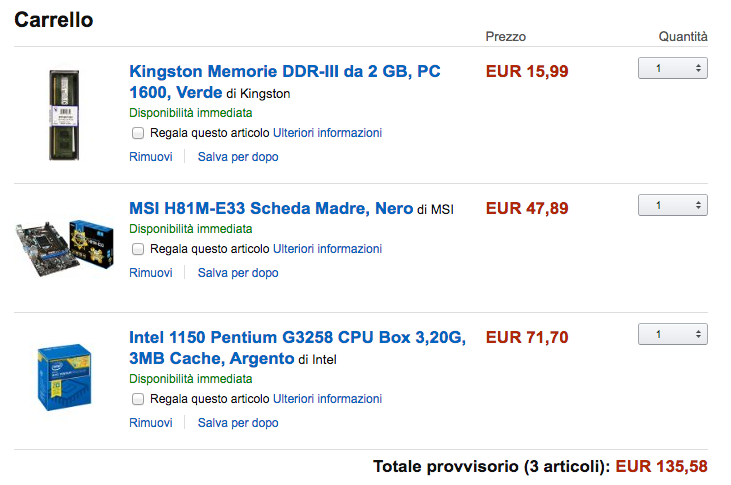
So, what do you know, a 3258 might just be in order. Time to revise my emulation box build.
OMFG thank you so much!
You just saved me a lot of headaches and money. Now I know that a G3258 is the way to go as there isn't probably a cheaper choice.

ty ty ty ^_^

@xyga: I knew about the speedstep problem. Back when I used PCs, first thing I always did was disabling all those power saving features because back then they had more issues than benefits.
I'd still do it today, but 10 years ago I switched to Macs and didn't look back.

Having a PC booting windows XP has been a fantastic throwback, I thoroughly enjoyed it for the first 10 minutes.
Then when drivers and other issues arose, I remembered why I ran off PCs :P

Hopefully when I'll be done configuring stuff I won't have to touch anything anymore and just enjoy it.

Now that almighty QXC got me the intel (no pun intended), I'll start looking around for a decent albeit cheap setup and see what I can come up with.

Thanks again to all the people involved so far!
User avatar
donluca
Posts: 865
Joined: Sat Feb 28, 2015 8:51 pm
Location: Italy
Contact:

Re: Tell me about your MAME setup

Post by donluca »

Image

...and just bought a Radeon X300 SE on ebay for 10€.
So I just need to add a Power Supply.

I'm following some auctions on eBay for a couple of Seasonics 350W which should be enough since I'm not really using the graphic card. If they skyrocket, I can buy for 20€ a 450W Nilox which is an italian manufacturer which seems to use Seasonic PSUs in their line.

Hopefully with 160-170€ I'll have everything I need.
User avatar
Ex_Mosquito
Posts: 591
Joined: Tue Jan 25, 2005 11:17 pm
Location: United Kingdom, Newport S.Wales

Re: Tell me about your MAME setup

Post by Ex_Mosquito »

+1 for Groovymame+CRT_Emudrivers. I have been using it for over 2 years now. Up until that point I was 100% PCB only for playing arcade games on my cab. Normal Mame just isn't good enough; lagg controls, jerky scrolling, odd resolutions, but GroovyMame+CRT_Emudrivers changed all that. It really is as good as people say.

Here's my set-up. I've sold off all my pcbs now apart from 1 (Tetris Grandmaster 1) I'm not really a collector and there is literally no difference compared to the PCB, and trust me, I'm pretty fussy! :)

http://youtu.be/BwDJtjrwKHI
My Arcade 1-Credit Replays
http://www.youtube.com/user/exmosquito
User avatar
broken harbour
Posts: 943
Joined: Fri Feb 01, 2013 8:18 pm
Location: Canaduh
Contact:

Re: Tell me about your MAME setup

Post by broken harbour »

Is anyone here using MAME on Linux? Tell me about your experience, I just built a tiny Linux box.
User avatar
donluca
Posts: 865
Joined: Sat Feb 28, 2015 8:51 pm
Location: Italy
Contact:

Re: Tell me about your MAME setup

Post by donluca »

Ex_Mosquito wrote:+1 for Groovymame+CRT_Emudrivers. I have been using it for over 2 years now. Up until that point I was 100% PCB only for playing arcade games on my cab. Normal Mame just isn't good enough; lagg controls, jerky scrolling, odd resolutions, but GroovyMame+CRT_Emudrivers changed all that. It really is as good as people say.

Here's my set-up. I've sold off all my pcbs now apart from 1 (Tetris Grandmaster 1) I'm not really a collector and there is literally no difference compared to the PCB, and trust me, I'm pretty fussy! :)

http://youtu.be/BwDJtjrwKHI
Outstanding setup and great video!

One thing I've read across the boards is that the inputs are not completely lag-free but there's an entire frame of lag which can't be removed due to how MAME emulation works.
It shouldn't be a great deal of course, but I'm afraid it might have an impact on shmups and beat'em ups.

I've also read of a particular version of MAME, SHMUP MAME, which has been made with the purpose of reducing the input lag as much as possible. Is it better than GroovyMAME?
User avatar
donluca
Posts: 865
Joined: Sat Feb 28, 2015 8:51 pm
Location: Italy
Contact:

Re: Tell me about your MAME setup

Post by donluca »

broken harbour wrote:Is anyone here using MAME on Linux? Tell me about your experience, I just built a tiny Linux box.
I really, REALLY wanted to go the Linux way, but a kind user discouraged going down the penguin path. It's a post back in the thread, if you go through it you'll find it.

Anyway!

I've bought my first two pieces of my setup:

PSU: Antec VP350P. Not great efficiency but very stable voltages (especially the 12V rails) and very low ripple and noise, which is great for a stable overclock. Got a huge deal at 23,50€

MB: AsRock H81M-HDS. Four VRM phases as opposed to three of the competitors for, again, a stable overclock. Again, snapped a very nice deal at 46€

VGA: Radeon X300 SE. Since it's passive, I'll probably downclock and get voltages down to keep it cool since MAME doesn't use it. 10€


I still need to get:

CPU: Intel Pentium G3258 – hopefully I'll get a nice overclocker!

RAM: 1GB or 2GB DDR3 whatever. Since I'll be using Windows XP, 1GB will be plenty. I'll probably keep them at standard clock or even downclock them for better stability.

Thermal Grease: Prolimatech PK-3. Getting this only because I've found a huge deal on this at 5€ (it's one of the best Thermal greases on the market)


I'll see if I need a third party cooler. I've heard the stock one is really good so hopefully I won't need another one.

I'll keep you updated with the progress!
User avatar
QXC
Posts: 46
Joined: Sun Oct 04, 2015 9:53 am

Re: Tell me about your MAME setup

Post by QXC »

Ram is so cheap on the low end you may as well get a 4gb stick.
User avatar
cools
Posts: 2057
Joined: Mon Nov 26, 2007 4:57 pm
Location: South Wales
Contact:

Re: Tell me about your MAME setup

Post by cools »

Regarding lag, there's a thread on BYOAC with tests demonstrating that Groovy (in Windows) responds as quickly as the PCB being emulated.
Image
User avatar
donluca
Posts: 865
Joined: Sat Feb 28, 2015 8:51 pm
Location: Italy
Contact:

Re: Tell me about your MAME setup

Post by donluca »

cools wrote:Regarding lag, there's a thread on BYOAC with tests demonstrating that Groovy (in Windows) responds as quickly as the PCB being emulated.
Thanks, I'll look that thread up!

A small update: the only component I got so far is the motherboard and guess what? They sent me the wrong one -_-'
I told them about the mistake and they offered to take it back and give me a full refund but it seemed that they didn't have that particular motherboard in stock, so I just took the refund and called it a day.

So back to square one... still waiting for the Radeon X300SE to arrive along with the 1GB RAM stick. *sighs*
User avatar
Fudoh
Posts: 13045
Joined: Mon Mar 06, 2006 3:29 am
Location: Germany
Contact:

Re: Tell me about your MAME setup

Post by Fudoh »

Xyga, did you read the Asus PG279Q review on tftcentral ? What's your opinion ?

I think it's extremely tempting for a nice MAME setup, but there's a one point I'm wondering about: while G-SYNC will obviously be the prefered operating mode for the Asus on any MAME setup, the ULMB mode for 120Hz inputs sounds tempting as well. Those UFO-tracking snapshots look better than on the current OLEDs. Do you (or anybody else) have any idea if MAME can be configured to run in a v-sync'ed 1:2 (input to output refresh) 120Hz setup ?
User avatar
donluca
Posts: 865
Joined: Sat Feb 28, 2015 8:51 pm
Location: Italy
Contact:

Re: Tell me about your MAME setup

Post by donluca »

You should ask Calamity about that. I'm sure he could do some magic trickery and add an option to MAME for it.

BTW, got my PSU and Radeon X300SE card today, so now I just have to wait for the MB, CPU and RAM and hopefully I'm set!
cfx
Posts: 936
Joined: Tue Dec 02, 2008 8:12 pm

Re: Tell me about your MAME setup

Post by cfx »

.
Last edited by cfx on Thu May 29, 2025 7:25 am, edited 1 time in total.
User avatar
donluca
Posts: 865
Joined: Sat Feb 28, 2015 8:51 pm
Location: Italy
Contact:

Re: Tell me about your MAME setup

Post by donluca »

I'm downclocking memory to keep stuff stable and cool. I just want to pump what's actually used by MAME, so I'll probably shut down everything in the CPU but one core to try and get its frequencies as high as possible while keeping voltages (and temps) low.

I'll be using MicroXP which only uses like ~64MB of RAM so I'll have plenty for MAME since I won't be using CHD games. I'll probably disable the paging file to speed things up a bit, especially the boot process, I don't think I'll hit 1GB of memory in use.

About the thermal grease: the one supplied with the stock cooler is pretty bad, you can easily get 10°C off with a good grease properly applied (there was a huge benchmark on one site, you can google it with the results from like 50 different greases) instead of investing for a third party cooler.

I can't wait for all the stuff to arrive to set things up and see how it will all work.
User avatar
QXC
Posts: 46
Joined: Sun Oct 04, 2015 9:53 am

Re: Tell me about your MAME setup

Post by QXC »

Fudoh wrote:while G-SYNC will obviously be the prefered operating mode for the Asus on any MAME setup
Why would you want G-SYNC for mame? Having variable frame rates doesn't make much sense for games that were designed to run at a fixed frame rate. ULMB seems like the way to go.
donluca wrote:I'm downclocking memory to keep stuff stable and cool. I just want to pump what's actually used by MAME, so I'll probably shut down everything in the CPU but one core to try and get its frequencies as high as possible while keeping voltages (and temps) low.

I'll be using MicroXP which only uses like ~64MB of RAM so I'll have plenty for MAME since I won't be using CHD games. I'll probably disable the paging file to speed things up a bit, especially the boot process, I don't think I'll hit 1GB of memory in use.
I see no reason why you'd want to underclock the memory, the stuff is made to be perfectly stable at stock speeds. I also don't understand why you would only get 1gb, here in the US at least a 2gb stick is the cheapest you can find, and 4gb sticks are ~$5 more. I'm actually somewhat surprised you can find 1gb DDR3 sticks, I don't think they make them new anymore.

For what it's worth, I use 7 for my groovymame setup and have no issues outside of desktop stuff being a bit sluggish when you are doing video things. The CRT emudriver tweaks make some stuff a bit weird, but I have no issues with mame.
User avatar
donluca
Posts: 865
Joined: Sat Feb 28, 2015 8:51 pm
Location: Italy
Contact:

Re: Tell me about your MAME setup

Post by donluca »

Well, since I'm aiming at keeping it at a budget, 1GB DDR3 is 6€ (used ofc, they don't make them anymore), while 2GB is 16€ (12€ used) here in Italy. Since I'll probably never use more than 1GB with my MAME setup, there's no need to spend more. If I see issues, I can always buy another 1GB.
User avatar
Fudoh
Posts: 13045
Joined: Mon Mar 06, 2006 3:29 am
Location: Germany
Contact:

Re: Tell me about your MAME setup

Post by Fudoh »

Why would you want G-SYNC for mame? Having variable frame rates doesn't make much sense for games that were designed to run at a fixed frame rate. ULMB seems like the way to go.
But using ULMB still requires to adjust the games' internal refresh rate to what your monitor is running it. And to eliminate tearing you need to enable v-sync. Using G-SYNC instead allows you disable v-sync and get the games' native refresh rate from your monitor, e.g. 55Hz when running R-Type or 54Hz when running Raiden.
cfx
Posts: 936
Joined: Tue Dec 02, 2008 8:12 pm

Re: Tell me about your MAME setup

Post by cfx »

.
Last edited by cfx on Thu May 29, 2025 7:24 am, edited 1 time in total.
User avatar
Ed Oscuro
Posts: 18654
Joined: Thu Dec 08, 2005 4:13 pm
Location: uoıʇɐɹnƃıɟuoɔ ɯǝʇsʎs

Re: Tell me about your MAME setup

Post by Ed Oscuro »

Kind of a late response, but don't take for granted that any plan of action w/r/t overclocking/downclocking will give you the best performance until you try it out.

Many motherboards today are pretty good about offering one-click or minimal configuration to get good performance. Of course, they won't be dedicated towards MAME, but I don't see any reason not to use memory profiles (loaded from the memory modules) if available, and likewise if there is any option to sync memory to the CPU (or similar) that should be an obvious choice (even in MAME, I think you'd want to pay attention to getting memory from RAM to the CPU as smoothly as possible; memory modules in sync with the CPU will reduce the cost of memory reads from RAM due to cache misses or other reasons).

Also, I'm not so sure that ULMB at arcade frame rates will be very lovely. The flicker inbetween frames is not at all like what you'd see in 240p output.
User avatar
Xyga
Posts: 7181
Joined: Tue Nov 05, 2013 8:22 pm
Location: block

Re: Tell me about your MAME setup

Post by Xyga »

Fudoh wrote:Xyga, did you read the Asus PG279Q review on tftcentral ? What's your opinion ?

I think it's extremely tempting for a nice MAME setup, but there's a one point I'm wondering about: while G-SYNC will obviously be the prefered operating mode for the Asus on any MAME setup, the ULMB mode for 120Hz inputs sounds tempting as well. Those UFO-tracking snapshots look better than on the current OLEDs. Do you (or anybody else) have any idea if MAME can be configured to run in a v-sync'ed 1:2 (input to output refresh) 120Hz setup ?
Oops ! Missed that. ^^"

Of course, it is the most interesting monitor so far. And this time it's got an HDMI input for convenience, no aspect ratio controls though (still matters in some scenarios).
My problem is after witnessing OLED in real life is that I've come to think that in 2015 LCD has become a completely obsolete technology, so I can't reconcile with the idea of spending so much money even for the best LCD in the world (maybe I would if it was 32" but no).

Regarding MAME if you mean forced 120Hz output, which would be compulsory here, I think it's very possible though not sure it can be done directly from an UI, it's something to do from the .INI, and probably that of GroovyMAME or from RA since both have extended 'options'.
What I'm wondering as well is how will the options relative to 'simulated' game speed fare in doubled-but-not-really output, since 'sync to monitor refresh' was made for your usual 50/60Hz monitors (I mean does it lock at 120, gotta try).
Terrible judder/stutter or completely wrong speed in cases ?

Probably some people here have tried that already. Please guys ? ^^
Too bad we've still got so few testimonies about MAME with 120Hz, G-Sync, ULMB...again I bet the price of those monitors is the issue here, it's almost exclusively PC-gamers who will spend the money on this, not retrogamers. For that amount we usually buy a valuable game, a cab, a great CRT or a large TV set, not an lcd monitor. :?
Strikers1945guy wrote:"Do we....eat chicken balls?!"
cfx
Posts: 936
Joined: Tue Dec 02, 2008 8:12 pm

Re: Tell me about your MAME setup

Post by cfx »

.
Last edited by cfx on Thu May 29, 2025 7:32 am, edited 1 time in total.
User avatar
Xyga
Posts: 7181
Joined: Tue Nov 05, 2013 8:22 pm
Location: block

Re: Tell me about your MAME setup

Post by Xyga »

Yeah 2GB is better for an XP emu setup.
Strikers1945guy wrote:"Do we....eat chicken balls?!"
User avatar
Ed Oscuro
Posts: 18654
Joined: Thu Dec 08, 2005 4:13 pm
Location: uoıʇɐɹnƃıɟuoɔ ɯǝʇsʎs

Re: Tell me about your MAME setup

Post by Ed Oscuro »

cfx wrote:Take what you're spending on that thermal grease you don't need to get the extra 1GB; not a single 2GB stick but a pair of 1GB ones. You don't want to run this CPU with single channel memory. It makes no sense whatsoever to be overclocking while simultaneously constraining what is just default performance. It's the same thing with you talking about disabling the second core. MAME is probably single-threaded (I don't know or care) but XP itself will assign tasks to the two cores, and without the ability for it to do that again you will find random unexplained frame dips.
Good explanation here. Now that I think of it, all the Intel multicore chips I'm familiar with are quite smart with power usage when there's just one core doing work. MAME is, of course, singlethreaded, except for the might-as-well option for putting rendering on a different thread. Any future emulator which makes use of multithreading would be severely hampered by disabling a core here, and of course cfx's right, if a service in the background starts doing something fun and wacky, you don't want MAME's execution thread suddenly having to share time with that.

It's such a gentle chip, anyway, that I'd not be overly worried about its heat usage. It's only slightly more demanding than 35W chips found in many laptops. If heat, cooling, and dust avoidance are that important, ultimately you'll have to go to a lower-power part, rather than trying to break the design from doing what it's intended to do.

The comments on RAM are worth discussing a bit further: Sluggish multitasking and desktop performance in Windows shouldn't be terribly relevant to running a single program with near-total CPU control (so long as you're not so resource constrained that your program is swapping to disk itself, and keeping in mind what cfx said about having a second core for services). It is nice to have Windows responsive when you do quit out of MAME or some other program, but if you've got things organized and tamed some of the components, that pain should be minimal. But overall, I think that getting a reasonable amount of RAM (no less than 3GB for a modern system) is a great idea, especially since it gives you room for the future.

Two other things that are seriously worth a look:
Linux (most any emulator worth its salt has a Linux distro, and this ought to be a way to avoid a lot of the fun of Windows)
A solid state drive (even a tiny 4K MAME ROM can take ages to load if it's on an idled magnetic disk with the heads parked).
Last edited by Ed Oscuro on Fri Oct 30, 2015 7:57 am, edited 1 time in total.
User avatar
Xyga
Posts: 7181
Joined: Tue Nov 05, 2013 8:22 pm
Location: block

Re: Tell me about your MAME setup

Post by Xyga »

While I agree it is very possible to 'tame' most Windows down to quite low memory usage, I'd say it's just not really worth the time and attention considering the price of 2GB today.
Anyway it's not that important as this is an easy and cheap upgrade anytime later if needed.

Also agreed there shouldn't be any concerns regarding heat with the G3258, again from the reports it's doing fine with stock fan even when OC'd @4GHz.
Haswell ftw.
Strikers1945guy wrote:"Do we....eat chicken balls?!"
User avatar
Ed Oscuro
Posts: 18654
Joined: Thu Dec 08, 2005 4:13 pm
Location: uoıʇɐɹnƃıɟuoɔ ɯǝʇsʎs

Re: Tell me about your MAME setup

Post by Ed Oscuro »

Edited my post a bit, should have essentially the same meaning.

About the RAM, it's for that reason that I'd consider just ditching Windows altogether. If you're just doing emulators, I'd just say it's probably not really worth the time and effort.

Wasn't it the case some years back that MAME performance was considerably better in some Linux distributions?

Of course, with Linux, the pitfall is driver support, and that can be a problem for any 3D emulator.

Edit: Bahaha, Amazon just sent me an ad for Prolimatech PK-3 Nano Al...uhh, I haven't looked at any of that TIM stuff in days. Still not good timing, sorry Amazon :mrgreen:
User avatar
Xyga
Posts: 7181
Joined: Tue Nov 05, 2013 8:22 pm
Location: block

Re: Tell me about your MAME setup

Post by Xyga »

Ed Oscuro wrote:Of course, with Linux, the pitfall is ...
IMHO unless you're already used to it and the 'ports' Linux is a bad choice for emus, it requires much more work and attention compared your average Win setup.

MAME already finds enough of a boost in running from a 64bit OS, after that the choice to go Linux is more of an individual preference I think, because it'll never be for everyone.
Strikers1945guy wrote:"Do we....eat chicken balls?!"
User avatar
Hoagtech
Posts: 1025
Joined: Mon Apr 27, 2015 3:53 am
Location: Bellingham, WA

Re: Tell me about your MAME setup

Post by Hoagtech »

Xyga wrote:While I agree it is very possible to 'tame' most Windows down to quite low memory usage, I'd say it's just not really worth the time and attention considering the price of 2GB today.
Anyway it's not that important as this is an easy and cheap upgrade anytime later if needed.

Also agreed there shouldn't be any concerns regarding heat with the G3258, again from the reports it's doing fine with stock fan even when OC'd @4GHz.
Haswell ftw.
That's the very reason I bought a HP Proliant Server tower. I have every feature of windows 8.1 installed on Windows Server 2012 R2 on my Proliant G6. I have 2 Xenon CPU's running 4 Cores Each with 128 GB of ram in each Core for a total of 256 Gb of ram. I have my 2 256 GB SSD running in RAID 0. the only bottleneck is the single PCIe port or I would be using more than one OC'ed GTX 780 ti

I click at the speed of thought. It takes 3 minutes to run server check "before" bootup, but less than 8 seconds to load windows bios to Gui.
If your really into windows, there are coming out with Windows server 2016 complete with xbox one streaming. I would love to play halo 5 on my pc for some reason.
Copyright 1987
User avatar
Ed Oscuro
Posts: 18654
Joined: Thu Dec 08, 2005 4:13 pm
Location: uoıʇɐɹnƃıɟuoɔ ɯǝʇsʎs

Re: Tell me about your MAME setup

Post by Ed Oscuro »

Xyga wrote:
Ed Oscuro wrote:Of course, with Linux, the pitfall is ...
IMHO unless you're already used to it and the 'ports' Linux is a bad choice for emus, it requires much more work and attention compared your average Win setup.
Yeah, you wouldn't jump into a new OS blind, of course. But I think it is also pretty well behaved with not as much in the way of background services (or their equivalents) as Windows, which might have some good effects on power usage and so on. But, generally, I think the Pentium Anniversary is just going to be so capable, and not more.

By the way, here's some pretty recent information on high frame rates and G-Sync monitors:
http://www.pcper.com/news/Graphics-Card ... SUS-PG279Q

They tested with the pg279q and a Geforce 980 Ti, interesting result: nVidia's power ramping is more primitive than Intel's and AMD's. (However, glancing at comments in the investigation article, there's still a question as to which cards are better at load / normal idle.)

It does seem to me that the "ramp up to max" point might be different on other GPUs, perhaps better or worse depending on how high they ramp up or their maximum operating ranges; I'd like to see others tested. Personally, I wasn't interested in going above 120Hz often, but this is certainly interesting for anybody interested in starting high frame rate monitors on nVidia architectures (any architecture where the pixel clock isn't high enough to sustain the framerate at the given CPU clock).
Hoagtech wrote:If your really into windows, there are coming out with Windows server 2016 complete with xbox one streaming. I would love to play halo 5 on my pc for some reason.
That Nano Server install sounds interesting, but I wouldn't count on the server edition being a big gaming performer (for example, in going to the Nano Server version, you swear off 32-bit programs entirely). The Xbox One streaming is going to be a feature of client Windows 10; I haven't read anything about that being discussed for the Server edition.
kamiboy
Posts: 2000
Joined: Sat Sep 04, 2010 4:40 pm
Location: Denmark

Re: Tell me about your MAME setup

Post by kamiboy »

Since I've decided to purchase a candy cab as soon as a good unit turns up for sale I am going to start experimenting with MAME.

This thread seems to be set on Groovy, but lately I've been building up a whole lot of experience with using DOS. I think I am going to give ADVANCE MAME a go. The idea of a MAME machine that boots into MAME in seconds via DOS appeals to me much more than having to deal with a bloated windows installation.

I prefer to spend as little as possible on this endeavour, so I am going to try using only PC hardware I've fished out of the E-recyle bin of my building. I believe even newer(ish) PC hardware can boot into DOS since some motherboards use that as a means for low level firmware updates.

I'll report my progress here.
Post Reply