Gameboy Advance RGB NTSC

The place for all discussion on gaming hardware
Post Reply
Smashbro29
Posts: 532
Joined: Thu Dec 15, 2011 2:46 am

Re: Gameboy Advance RGB NTSC

Post by Smashbro29 »

That's an excellent idea. Using the new loader's 16:9 mode, ULL and zooming manually with the FM will probably produce the ideal picture. Big as can be and even enough for scanlines.

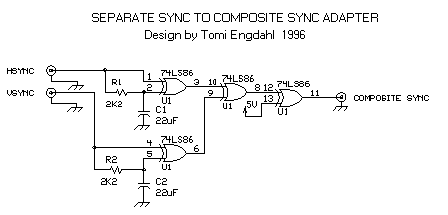
And it would only get better if you used this circuit
Spoiler
Image
to change to the cable type because the FM still kinda sucks at component.
12345
Posts: 144
Joined: Sat May 31, 2014 11:08 am

Re: Gameboy Advance RGB NTSC

Post by 12345 »

If your system is PAL you can also go directly through RGB-SCART.
Smashbro29
Posts: 532
Joined: Thu Dec 15, 2011 2:46 am

Re: Gameboy Advance RGB NTSC

Post by Smashbro29 »

Also true but I'm just too patriotic.

Side note: What's good to use as a controller for GBA? Anything with a good dpad that works on Gamecube?
User avatar
opt2not
Posts: 1289
Joined: Fri May 20, 2011 6:31 pm
Location: Southern California

Re: Gameboy Advance RGB NTSC

Post by opt2not »

Smashbro29 wrote:Side note: What's good to use as a controller for GBA? Anything with a good dpad that works on Gamecube?
SNES pad + SNES Retroport adapter is what I use.
http://www.retrousb.com/product_info.ph ... ucts_id=31

They're officially discontinued but you could probably find them elsewhere like ebay or whatnot. Retrousb does have NES --> GC adapters and they're pretty good for games that only need 2 buttons to play with.
User avatar
BazookaBen
Posts: 2159
Joined: Thu Apr 17, 2008 8:09 pm
Location: North Carolina

Re: Gameboy Advance RGB NTSC

Post by BazookaBen »

I use the Hori Digital controller, but they're getting pretty expensive now on ebay if you don't already have one. Use it for most VC games too.

http://www.ign.com/articles/2004/03/05/ ... r-gamecube
User avatar
blizzz
Posts: 1150
Joined: Fri Sep 16, 2011 6:19 pm
Location: Germany
Contact:

Re: Gameboy Advance RGB NTSC

Post by blizzz »

The Hori controller isn't that great imo. The big A button makes it awkward to use for Gameboy games and the dpad is too stiff for my tastes. I hope Extrems manages to add support for original GBA as controllers. If not I might search for a SNES > GCN adapter like opt2not linked.
Smashbro29
Posts: 532
Joined: Thu Dec 15, 2011 2:46 am

Re: Gameboy Advance RGB NTSC

Post by Smashbro29 »

opt2not wrote:
Smashbro29 wrote:Side note: What's good to use as a controller for GBA? Anything with a good dpad that works on Gamecube?
SNES pad + SNES Retroport adapter is what I use.
http://www.retrousb.com/product_info.ph ... ucts_id=31

They're officially discontinued but you could probably find them elsewhere like ebay or whatnot. Retrousb does have NES --> GC adapters and they're pretty good for games that only need 2 buttons to play with.
How's the input lag? Non-existent?

Found a link:
http://www.nesrepairshop.com/Catalog/in ... cts_id=764
User avatar
opt2not
Posts: 1289
Joined: Fri May 20, 2011 6:31 pm
Location: Southern California

Re: Gameboy Advance RGB NTSC

Post by opt2not »

Smashbro29 wrote:
opt2not wrote:
Smashbro29 wrote:Side note: What's good to use as a controller for GBA? Anything with a good dpad that works on Gamecube?
SNES pad + SNES Retroport adapter is what I use.
http://www.retrousb.com/product_info.ph ... ucts_id=31

They're officially discontinued but you could probably find them elsewhere like ebay or whatnot. Retrousb does have NES --> GC adapters and they're pretty good for games that only need 2 buttons to play with.
How's the input lag? Non-existent?

Found a link:
http://www.nesrepairshop.com/Catalog/in ... cts_id=764
The lag's (or lack of) is great. Nothing noticeable from what I can tell and I'm also running the ULL version on my GC.

I also have a Raphnet adapter (actually multiple ones for different controllers/consoles) and they are also great and probably cheaper alternatives:
http://www.raphnet-tech.com/products/sn ... /index.php

Rapheal has a lot of different adapters for many systems, and I would recommend his products in a heartbeat. The best thing is he's constantly working on them, and if you ever come across a problem, just contact him and he'll get you a replacement or fix promptly.
Smashbro29
Posts: 532
Joined: Thu Dec 15, 2011 2:46 am

Re: Gameboy Advance RGB NTSC

Post by Smashbro29 »

So Raphnet or the other one? I've heard raphnet has no input lag on other adapters before.

And how do the buttons get mapped on the one you have? That's a pretty big deal, probably wanna have Y be my "B" and B be my "A" and the Raphnet seems to have that option.
User avatar
opt2not
Posts: 1289
Joined: Fri May 20, 2011 6:31 pm
Location: Southern California

Re: Gameboy Advance RGB NTSC

Post by opt2not »

Yeah some of Raphnet's adapters have different configurations you can enable on powering-up. I don't think the SNES-->GC adapter has different settings, but I know his SNES-->PSX adapter has 7 different configs. As for the Retrousb one, there aren't any options for different configurations that I know of. I'll have to check it when I get home from work.
Smashbro29
Posts: 532
Joined: Thu Dec 15, 2011 2:46 am

Re: Gameboy Advance RGB NTSC

Post by Smashbro29 »

I've since done the research.

http://www.raphnet-tech.com/downloads/s ... ual_v1.pdf

He doesn't have the configuration I want but I emailed him and he might just put it in.

What other button layouts would be nice to have for this new Gameboy loader? I'll email him all of them so hopefully no one is left out in the cold.

Does the loader itself have any specific buttons it uses?
User avatar
bobrocks95
Posts: 3663
Joined: Mon Apr 30, 2012 2:27 am
Location: Kentucky

Re: Gameboy Advance RGB NTSC

Post by bobrocks95 »

In looking into those adapters I decided that all I'd really need is for the L and R buttons to be enabled (as L and R) instead of an emulator shortcut in the first alternate mode you access with start. That would let you use the y + b route or the a + b route depending on preference, and both would be usable for Gameboy up through GBA if the shoulders are added back in.
PS1 Disc-Based Game ID BIOS patch for MemCard Pro and SD2PSX automatic VMC switching.
User avatar
Einzelherz
Posts: 1279
Joined: Wed Apr 09, 2014 2:09 am

Re: Gameboy Advance RGB NTSC

Post by Einzelherz »

Has anyone tried a PS2 to GCN adapter?
amaradona
Posts: 121
Joined: Thu Apr 18, 2013 5:11 pm
Location: London

Re: Gameboy Advance RGB NTSC

Post by amaradona »

12345 wrote:1. The cheapest you can get is by buying a XenoGC and using a WiikeySD (or knockoff). You could also burn an Iso instead of using a key, provided you have got the modchip.
2. The ULL version works perfectly with the framemeister. I have to admit I could use some help on adjusting the sync level more stably though. Any recommendations?
3. I figured you can get up to 6x scale by setting the ZOOM_SIZE to 75. Even scanlines work at this setting (if you adjust V_WIDTH as well) and you only have to live with small boarders.

Hope this helps.

BTW:
@blizzz
If you read this: Thanks for requesting the GBA-controller mode on gc-forever ;)
Are we talking 1080p or 720p output with the framemeister?
Cheers!
Smashbro29
Posts: 532
Joined: Thu Dec 15, 2011 2:46 am

Re: Gameboy Advance RGB NTSC

Post by Smashbro29 »

That is an excellent question because 1080p GBA with scanlines and almost no lag is a great idea.
User avatar
Fudoh
Posts: 13044
Joined: Mon Mar 06, 2006 3:29 am
Location: Germany
Contact:

Re: Gameboy Advance RGB NTSC

Post by Fudoh »

Are PAL Cubes as good for running this as NTSC Cubes are ?

Not talking about the output signal, but I'm thinking about clock precision. As in PAL SNES or MD running at 60Hz without a crystal mod and thus not running at the same exact speed as genuine NTSC units.
User avatar
Unseen
Posts: 738
Joined: Sun May 25, 2014 8:12 pm
Contact:

Re: Gameboy Advance RGB NTSC

Post by Unseen »

Fudoh wrote:Are PAL Cubes as good for running this as NTSC Cubes are ?

Not talking about the output signal, but I'm thinking about clock precision. As in PAL SNES or MD running at 60Hz without a crystal mod and thus not running at the same exact speed as genuine NTSC units.
The Gamecube uses the same master clock for both PAL and NTSC units. I don't remember what value the actual crystal on the board has (likely 27.0 or 54.0 MHz), but all timings are based around integer multiples or fractions of 54.0 MHz regardless of the region.

(random trivia: see here for a history of Rec. 601, which standardized a common 13.5MHz sampling frequency for both PAL and NTSC)
12345
Posts: 144
Joined: Sat May 31, 2014 11:08 am

Re: Gameboy Advance RGB NTSC

Post by 12345 »

@amaradona
I'm talking about 1080p.

@Fudoh
The N64 was reported to also suffer from this problem. Unfortunately there's no crystal mod for this console yet.
amaradona
Posts: 121
Joined: Thu Apr 18, 2013 5:11 pm
Location: London

Re: Gameboy Advance RGB NTSC

Post by amaradona »

12345 wrote:@amaradona
I'm talking about 1080p.

@Fudoh
The N64 was reported to also suffer from this problem. Unfortunately there's no crystal mod for this console yet.
Thank you!
Smashbro29
Posts: 532
Joined: Thu Dec 15, 2011 2:46 am

Re: Gameboy Advance RGB NTSC

Post by Smashbro29 »

12345 wrote:@amaradona
I'm talking about 1080p.
If you've done this yourself could you give the exact settings?
12345
Posts: 144
Joined: Sat May 31, 2014 11:08 am

Re: Gameboy Advance RGB NTSC

Post by 12345 »

Smashbro29 wrote:
12345 wrote:@amaradona
I'm talking about 1080p.
If you've done this yourself could you give the exact settings?
ZOOM_SIZE: 75 and V_WIDTH: 31 should do the job. You might already be familiar with other settings like H/V-SCALER (4/7), SHARPNESS 0, PICTURE... Just have a look at other 240p profiles.

Just a brief question to everybody who uses the ULL version:
Do you also realize heavy tearing the longer you play or is it just me? On games like Kirby: Nightmare in Dreamland I get wavy tearing as soon as the character/picture scrolls, especially vertically. When there is no motion, no tearing is present. The effect appears after 5-10 minutes of gaming and is not permanent. Any thoughts?
User avatar
bobrocks95
Posts: 3663
Joined: Mon Apr 30, 2012 2:27 am
Location: Kentucky

Re: Gameboy Advance RGB NTSC

Post by bobrocks95 »

RE the ULL version, Extrems said before
It should be tearing-free for hours, but I previously had one report of it tearing within a minute.
Seems to happen to others, but shouldn't? Tried other configurations?
PS1 Disc-Based Game ID BIOS patch for MemCard Pro and SD2PSX automatic VMC switching.
Smashbro29
Posts: 532
Joined: Thu Dec 15, 2011 2:46 am

Re: Gameboy Advance RGB NTSC

Post by Smashbro29 »

12345 wrote:
Smashbro29 wrote:
12345 wrote:@amaradona
I'm talking about 1080p.
If you've done this yourself could you give the exact settings?
ZOOM_SIZE: 75 and V_WIDTH: 31 should do the job. You might already be familiar with other settings like H/V-SCALER (4/7), SHARPNESS 0, PICTURE... Just have a look at other 240p profiles.
If its all the same to you I'd really appreciate a profile from you, I'm not the most adept with the settings.
User avatar
BazookaBen
Posts: 2159
Joined: Thu Apr 17, 2008 8:09 pm
Location: North Carolina

Re: Gameboy Advance RGB NTSC

Post by BazookaBen »

The tearing only happens once every couple of hours and only lasts for a couple minutes, so it's no big deal for me.
12345
Posts: 144
Joined: Sat May 31, 2014 11:08 am

Re: Gameboy Advance RGB NTSC

Post by 12345 »

BazookaBen wrote:The tearing only happens once every couple of hours and only lasts for a couple minutes, so it's no big deal for me.
Yes, I can confirm that it stops after a couple of minutes. Nevertheless I had two games (Sonic Advance 2 and Kirby: Nightmare in Dreamland, in case anybody else wants to confirm this) which started tearing within the first 10 minutes of gameplay. I haven't played a lot of other games though to see what's causing this. Gotta do some tests with different sync levels, I guess, and see if it's doing anything with the issue.
User avatar
Thomago
Posts: 588
Joined: Fri Oct 26, 2012 7:01 pm
Location: Germany

Re: Gameboy Advance RGB NTSC

Post by Thomago »

I encounter the tearing as well; it seems to be inherent to the ULL-mode's signal as changing the Framemeister's sync options does nothing.
Also, while I'm at it: Does anybody else have the problem that the ULL-mode's signal is very low-contrast? In comparison, the LL-mode's signal looks absolutely perfect...
User avatar
bobrocks95
Posts: 3663
Joined: Mon Apr 30, 2012 2:27 am
Location: Kentucky

Re: Gameboy Advance RGB NTSC

Post by bobrocks95 »

A new version of the Gameboy Interface has been posted by Extrems, here's the release notes:
  • Added return to autoexec.dol
    Added memory card distribution files.
    Added auto-cropping for Game Boy screenshots.
    Optimized video rendering.
    Compressed with LZMA2.
    Reduced coil whine.
Also introducing an exploit for Super Smash Bros. Melee co-developed with Dan Salvato.

This first release may be imperfect. To activate, go to VS. Mode and Name Entry.
Look at the inner ring on the shiny side of the disc for matching version.
A clever name and proper guide to come later.

Download:
http://files.extremscorner.org/gamecube ... sbm/latest
This is great news for anyone who was unable to get the SD Media Launcher before it sold out. You should be able to load the Melee save onto a Gamecube memory card with a softmodded Wii, and it looks like you choose whichever save matches your version of Melee.
GCMM should work for this, though I'm not brushed up on my Wii homebrew these days.

You can also back out to the SD Media Launcher's menu, and the optimized video rendering may fix some tearing issues for people.
PS1 Disc-Based Game ID BIOS patch for MemCard Pro and SD2PSX automatic VMC switching.
User avatar
Fudoh
Posts: 13044
Joined: Mon Mar 06, 2006 3:29 am
Location: Germany
Contact:

Re: Gameboy Advance RGB NTSC

Post by Fudoh »

Related question: on a chipped Cube, can a Cube memory card be used to load the player ? Similar to my PS2 where I have GSM on a Sony memory card....
User avatar
Thomago
Posts: 588
Joined: Fri Oct 26, 2012 7:01 pm
Location: Germany

Re: Gameboy Advance RGB NTSC

Post by Thomago »

bobrocks95 wrote:You can also back out to the SD Media Launcher's menu, and the optimized video rendering may fix some tearing issues for people.
Unfortunately it doesn't :(
12345
Posts: 144
Joined: Sat May 31, 2014 11:08 am

Re: Gameboy Advance RGB NTSC

Post by 12345 »

bobrocks95 wrote:A new version of the Gameboy Interface has been posted by Extrems, here's the release notes:
  • Added return to autoexec.dol
    Added memory card distribution files.
    Added auto-cropping for Game Boy screenshots.
    Optimized video rendering.
    Compressed with LZMA2.
    Reduced coil whine.
Also introducing an exploit for Super Smash Bros. Melee co-developed with Dan Salvato.

This first release may be imperfect. To activate, go to VS. Mode and Name Entry.
Look at the inner ring on the shiny side of the disc for matching version.

A clever name and proper guide to come later.

Download:
http://files.extremscorner.org/gamecube ... sbm/latest
Perfect! Does any of these changes apply to the ULL version?

Edit: Screen tearing is still present in the ULL version. I think we need to contact Extrems about it. I'm not sure if he's aware of this issue.
Post Reply