been messing with the settings with my ps2 through the mini, currently have it connected via component / d-t
does this console just look bad with some games no matter what you do?
for instance final fantasy 12, everything is so weirdly pixely until u use the camera to zoom in. perhaps its just this game or even my tv.
but if anyone knows otherwise or can give me more information please reply.
my current settings with the ps2 are the ones from the junkerhq;
(however i went with tweaking them a bit due to not knowing this games native output, with little to no difference)
Upscaling from 480i:
IMAGE_MODE = NATURAL (or picture depending)
H_SCALER = 6
V_SCALER = 5
SHARPNESS = 0 or 1 (0 recommended)
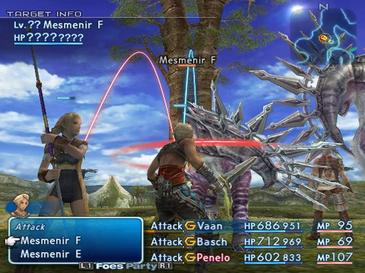
some screenshots....is this the best i can get out of this game/system? (i did upscale in order to get a good image, it does not look really any different)
http://i.imgur.com/hNwVysZ.jpg
http://i.imgur.com/xsrmyEB.jpg
http://i.imgur.com/u8Tt3jL.jpg
and the theres the pictures from the wikia
https://upload.wikimedia.org/wikipedia/ ... P_FF12.jpg
any ideas?
ps2 + xrgb mini best settings?


-
eightbitminiboss
- Posts: 450
- Joined: Mon Sep 17, 2012 9:01 pm
Re: ps2 + xrgb mini best settings?
You're expecting the Framemeister to upgrade the internal resolution of the game, which it does not do. I'm fairly sure that wikia image is more than likely a screenshot from PCSX2, a PS2 emulator.
-
KabuTheFox
- Posts: 39
- Joined: Tue Jun 09, 2015 8:02 pm
Re: ps2 + xrgb mini best settings?
i am not expecting it to look like perfect 1080p or anything, i was still expecting a bit better tho. I am asking IF there is anyway to make it look any better, since the settings on the mini are tweakable and the defaults are not ideal.eightbitminiboss wrote:You're expecting the Framemeister to upgrade the internal resolution of the game, which it does not do. I'm fairly sure that wikia image is more than likely a screenshot from PCSX2, a PS2 emulator.
the images from the wikia might very well be from pcsx2, it is something i considered
-
eightbitminiboss
- Posts: 450
- Joined: Mon Sep 17, 2012 9:01 pm
Re: ps2 + xrgb mini best settings?
No. What you're looking for is not possible through the Framemeister. It's scaler, it's going to scale the image is receives. You're looking for something that will increase the internal resolution of the polygons in the game.KabuTheFox wrote:i am not expecting it to look like perfect 1080p or anything, i was still expecting a bit better tho. I am asking IF there is anyway to make it look any better, since the settings on the mini are tweakable and the defaults are not ideal.eightbitminiboss wrote:You're expecting the Framemeister to upgrade the internal resolution of the game, which it does not do. I'm fairly sure that wikia image is more than likely a screenshot from PCSX2, a PS2 emulator.
the images from the wikia might very well be from pcsx2, it is something i considered
These were taken with FBX's profiles, click through to see them in full resolution:


Edit: Looked at the source image on Wikipedia. That picture came from GameSpot Australia in 2006, so this in actually a bullshot from Square themselves. The date it was uploaded puts it right before NA release.
-
KabuTheFox
- Posts: 39
- Joined: Tue Jun 09, 2015 8:02 pm
Re: ps2 + xrgb mini best settings?
again that is not what i was getting at (does such a thing even exist?)
what i am getting at is if my settings are the most optimal, the mini does have blurring for jaggies and other such settings. maybe i worded my initial question badly, ill rephrase.
'is that the best i will get out of the mini?'
i have no idea what fbx's profiles mean, but that is pretty much the same image i am getting. so i am guessing that is the best possible (guess i was a pretty gullible kid, cause i sure remember it looking better)
that actually makes a fair amount of sense, so pretty much it was an image taken from there engine and not from the ps2 hardware
what i am getting at is if my settings are the most optimal, the mini does have blurring for jaggies and other such settings. maybe i worded my initial question badly, ill rephrase.
'is that the best i will get out of the mini?'
i have no idea what fbx's profiles mean, but that is pretty much the same image i am getting. so i am guessing that is the best possible (guess i was a pretty gullible kid, cause i sure remember it looking better)
eightbitminiboss wrote:KabuTheFox wrote:eightbitminiboss wrote: Edit: Looked at the source image on Wikipedia. That picture came from GameSpot Australia in 2006, so this in actually a bullshot from Square themselves. The date it was uploaded puts it right before NA release.
that actually makes a fair amount of sense, so pretty much it was an image taken from there engine and not from the ps2 hardware
-
speedlolita
- Posts: 603
- Joined: Sat Aug 15, 2009 9:13 pm
- Location: Europe
Re: ps2 + xrgb mini best settings?
I seem to recall this game having a built in filter option, perhaps enable it if this is annoying you?
Alternatively, get a CRT.
Alternatively, get a CRT.
-
eightbitminiboss
- Posts: 450
- Joined: Mon Sep 17, 2012 9:01 pm
Re: ps2 + xrgb mini best settings?
Yes, that is the best you'll achieve. The Framemeister's strength is 2D sources for the most part. Low resolution polygons don't fare very well.KabuTheFox wrote:again that is not what i was getting at (does such a thing even exist?)
what i am getting at is if my settings are the most optimal, the mini does have blurring for jaggies and other such settings. maybe i worded my initial question badly, ill rephrase.
'is that the best i will get out of the mini?'
i have no idea what fbx's profiles mean, but that is pretty much the same image i am getting. so i am guessing that is the best possible (guess i was a pretty gullible kid, cause i sure remember it looking better)
that actually makes a fair amount of sense, so pretty much it was an image taken from there engine and not from the ps2 hardware
FBX is a user on this forum who posts his optimal settings since as of FW2.00 (we're on 2.00a now I believe) lets you use other people's profile settings. He has a couple for PS2 for interlaced and progressive signals. He posts them in the main XRGB-mini thread or you can grab it directly from his site.
Things will always look better than you remember
 . The main part is that you're remembering playing on a CRT television which hides a lot of the imperfections.
Yeah, there is a flicker filter. It does do a little bit of blurring, but won't make the game look any better.speedlolita wrote:I seem to recall this game having a built in filter option, perhaps enable it if this is annoying you?
Alternatively, get a CRT.
-
KabuTheFox
- Posts: 39
- Joined: Tue Jun 09, 2015 8:02 pm
Re: ps2 + xrgb mini best settings?
actually i was not playing on a crt, i was just playing on a rather small hdtv lol (probably 720p)
-
FBX

- Posts: 2349
- Joined: Wed Feb 18, 2015 10:18 am
- Location: DFW area, Texas
- Contact:
Re: ps2 + xrgb mini best settings?
My component PS2 profiles make use of focal blurring to reduce aliasing. I think I use something like H-SCALER: 10, V_SCALER: 5, and SHARPNESS: 1.
Interlaced mode uses "Natural" for the deinterlacer, and "Picture" for progressive modes.
Interlaced mode uses "Natural" for the deinterlacer, and "Picture" for progressive modes.
-
KabuTheFox
- Posts: 39
- Joined: Tue Jun 09, 2015 8:02 pm
Re: ps2 + xrgb mini best settings?
ill give that a try, thanksFBX wrote:My component PS2 profiles make use of focal blurring to reduce aliasing. I think I use something like H-SCALER: 10, V_SCALER: 5, and SHARPNESS: 1.
Interlaced mode uses "Natural" for the deinterlacer, and "Picture" for progressive modes.
also to the above comments, flicker filter does indeed do pretty much nothing from what i have seen. it adds a bit of a blur to jaggies but it does not do much to them, instead it makes text noticeably blurry.
it does make the map look better though as well as flat textures like walls, personal preference though seems to be with it off for crisp text.
-
austin532

- Posts: 844
- Joined: Wed Mar 12, 2014 12:44 am
- Location: Arizona, US
Re: ps2 + xrgb mini best settings?
There is only so much you can do with the PS2 picture quality. I tried several times and none of them look as good as I remembered on a CRT. I highly recommended using FBX's PS2 profiles as they have the correct AR and are scaled 2x. They definitely help with the jaggies. Also try setting H_Scaller to a higher number like 11 or 12.
People have been complaining about the way FFXII looks since it was first released. If it makes you feel any better the jaggies are noticeable on CRT's as well so Square Enix is the one to blame. Why they didn't see this as a problem is beyond me. I know the game was developed in 480p on VGA monitors and probably looked a lot less jaggy.
I believe the flicker filter was mainly used to reduce the flicking on CRT's with 480i games.
One last note is that not all games look bad. Games like Tekken Tag Tournament and Castlevania Lament of Innocence still look beautiful and have hardly any aliasing issues.
People have been complaining about the way FFXII looks since it was first released. If it makes you feel any better the jaggies are noticeable on CRT's as well so Square Enix is the one to blame. Why they didn't see this as a problem is beyond me. I know the game was developed in 480p on VGA monitors and probably looked a lot less jaggy.
I believe the flicker filter was mainly used to reduce the flicking on CRT's with 480i games.
One last note is that not all games look bad. Games like Tekken Tag Tournament and Castlevania Lament of Innocence still look beautiful and have hardly any aliasing issues.
Framemeister 240p scanline settings: http://shmups.system11.org/viewtopic.ph ... start=9600
-
Thomago

- Posts: 588
- Joined: Fri Oct 26, 2012 7:01 pm
- Location: Germany
Re: ps2 + xrgb mini best settings?
Final Fantasy XII has a lower horizontal resolution than most PS2 games (512 pixels instead of 640), so no wonder jaggies are very noticable.
-
FBX
- Posts: 2349
- Joined: Wed Feb 18, 2015 10:18 am
- Location: DFW area, Texas
- Contact:
Re: ps2 + xrgb mini best settings?
Actually the PS2 profiles for PS2 gaming are not integer-scaled, and this is because the focal blurring makes it not necessary to do so. Additionally, I found that most PS2 games seem to have a unique centering/timing for displaying graphics. As such, it made trying to align the images on the screen an impossible task for any one single profile.austin532 wrote:There is only so much you can do with the PS2 picture quality. I tried several times and none of them look as good as I remembered on a CRT. I highly recommended using FBX's PS2 profiles as they have the correct AR and are scaled 2x. They definitely help with the jaggies. Also try setting H_Scaller to a higher number like 11 or 12.
-
panzeroceania
- Posts: 196
- Joined: Mon Jul 19, 2010 8:52 am
Re: ps2 + xrgb mini best settings?
is there a possibility of a profile that under scans the image with integer scaling?FBX wrote:Actually the PS2 profiles for PS2 gaming are not integer-scaled, and this is because the focal blurring makes it not necessary to do so. Additionally, I found that most PS2 games seem to have a unique centering/timing for displaying graphics. As such, it made trying to align the images on the screen an impossible task for any one single profile.austin532 wrote:There is only so much you can do with the PS2 picture quality. I tried several times and none of them look as good as I remembered on a CRT. I highly recommended using FBX's PS2 profiles as they have the correct AR and are scaled 2x. They definitely help with the jaggies. Also try setting H_Scaller to a higher number like 11 or 12.
-
FBX
- Posts: 2349
- Joined: Wed Feb 18, 2015 10:18 am
- Location: DFW area, Texas
- Contact:
Re: ps2 + xrgb mini best settings?
The only reason to do an integer-based profile would be for sharply defined pixels, but even I had to admit most PS2 games look GOD-AWFUL when sharply defined. The focal-blurring using the H_Scaler function really does improve the picture quality for polygonal PS2 games.panzeroceania wrote:
is there a possibility of a profile that under scans the image with integer scaling?
That being said, the PS1 on PS2 profiles are in fact sharply defined and integer-based.