I bought a RGB SCART cable for my Sega Dreamcast and when I hook it up to my CRT TV the picture constantly rolls or flickers. I can see it outputs the right colors it just doesn't stay in sync. I try the same cable on my LCD TV, it works and doesn't show the same problem at all. Both TVs have support for RGB. In fact, i can use other RGB SCART cables on my CRT TV and they work just fine.
Can anyone tell me if there is something I can do to fix the problem ?
The TV is a Philips 32PW9551, rather modern so it should be able to handle all kinds of weird.
The Sega Dreamcast is a US model and thus connected to a stepdown converter. From 220V to 110V, maybe that can have something to do with it ?
Dreamcast RGB SCART not working
-
Inkvisitor

- Posts: 96
- Joined: Thu May 18, 2006 6:36 pm
I have taken some photos of the problem i describe. Obviously there is some kind of sync issue:


Last edited by Inkvisitor on Sun Mar 08, 2015 11:18 am, edited 1 time in total.
-
Dave_K.

- Posts: 4571
- Joined: Wed Jan 26, 2005 5:43 am
- Location: SF Bay Area
- Contact:
-
PC Engine Fan X!
- Posts: 9790
- Joined: Wed Jan 26, 2005 10:32 pm
If you are using a USA region or JPN region DC console with a Japanese Scart cable set, then you wouldn't have any problems with that particular setup...
If you use a PAL DC console with said Euro RGB Scart cable set, then you're good to go... ^_~
Or you could just get a Japanese Scart cable rewired to Euro Scart pinout and you're good to go in that respective department... ^_~
Do you have access to an Microcom produced XRGB (XRGB-1, XRGB-2, XRGB-2+ or the latest version, the XRGB-3) series upscan convertor by any chance?
PC Engine Fan X! ^_~
If you use a PAL DC console with said Euro RGB Scart cable set, then you're good to go... ^_~
Or you could just get a Japanese Scart cable rewired to Euro Scart pinout and you're good to go in that respective department... ^_~
Do you have access to an Microcom produced XRGB (XRGB-1, XRGB-2, XRGB-2+ or the latest version, the XRGB-3) series upscan convertor by any chance?
PC Engine Fan X! ^_~
-
neorichieb1971
- Posts: 8017
- Joined: Wed Jan 26, 2005 1:28 am
- Location: Bedford, UK
- Contact:
-
Daigohji

- Posts: 1291
- Joined: Thu Jul 06, 2006 2:09 pm
- Location: England
I can think of two possibilities. Either the cable isn't RGB SCART (in which case it's S-video SCART or composite SCART) or the relevant AV channel on your TV needs to be manually switched between video modes. On my Panasonic Quintrix pressing the respective AV button repeatedly on the remote cycles through the different video modes that the socket supports (RGB, S-video, etc).

-
D

- Posts: 3853
- Joined: Tue Feb 01, 2005 3:49 pm
- Location: Almere, Netherlands
- Contact:
You can also try to connect it through a vcr player. And make sure the vcr is turned on.
Experiment, I had this same problem once. US console with RGB scart cable with a PAL tv. The tv has RGB SCART. But I have to connect the vcr to the tv as well. I don't remember the exact part, but somehow the vcr provided the sync signal. I, to do this day don't fully understand how a vcr made the RGB picture possible.
Experiment, experiment.
Experiment, I had this same problem once. US console with RGB scart cable with a PAL tv. The tv has RGB SCART. But I have to connect the vcr to the tv as well. I don't remember the exact part, but somehow the vcr provided the sync signal. I, to do this day don't fully understand how a vcr made the RGB picture possible.
Experiment, experiment.
-
lewisit

- Posts: 267
- Joined: Fri May 11, 2007 3:54 pm
- Location: Hamburg / Germany
- Contact:

-
Inkvisitor
- Posts: 96
- Joined: Thu May 18, 2006 6:36 pm
Thank you for the replies!
I do in fact have a VCR I can hook up. I will do that in a moment.
The Dreamcast is a US model and the SCART cable is a european RGB cable, bought from play-asia.com. It is strange because the composite cable that came with the console is working flawlessly. So is the VGA box that I got from racketboy.
My TV has two SCART sockets and yes I am using the one that supports RGB and not just composite over SCART. My Sega Saturn has RGB SCART and is working when connected directly to this socket.
Ok, back to some more testing and reading about SCART...
I do in fact have a VCR I can hook up. I will do that in a moment.
The Dreamcast is a US model and the SCART cable is a european RGB cable, bought from play-asia.com. It is strange because the composite cable that came with the console is working flawlessly. So is the VGA box that I got from racketboy.
My TV has two SCART sockets and yes I am using the one that supports RGB and not just composite over SCART. My Sega Saturn has RGB SCART and is working when connected directly to this socket.
Ok, back to some more testing and reading about SCART...
-
Inkvisitor
- Posts: 96
- Joined: Thu May 18, 2006 6:36 pm
-
Inkvisitor
- Posts: 96
- Joined: Thu May 18, 2006 6:36 pm
Can anyone validate my theory why this isn't working? Ok here goes:
SCART uses the composite video pin 20 as SYNC when RGB mode is active. Now this signal is very important because if it isn't there, no picture. How is this signal shaped? Does it have a relationship to the 60Hz of the power supply?
Do you see what i am trying to say ? My TV is hooked up to a powergrid that uses 50Hz. My Dreamcast is hooked up to a stepdown converter that transforms 220V 50Hz into 110V 60Hz.
Is it possible that by using the stepdown converter it somehow messes up the sync signal ?
There is something that speaks against my theory. The first thing that happens in a Dreamcast is probably that it transforms the AC into DC before it hits any video decoder parts.
If I had a 300W stepdown and a TV that uses 110V 60Hz I would try it, but I don't have those things
Or if I had a oscilloscope, I could figure out how the sync signal looks.
SCART uses the composite video pin 20 as SYNC when RGB mode is active. Now this signal is very important because if it isn't there, no picture. How is this signal shaped? Does it have a relationship to the 60Hz of the power supply?
Do you see what i am trying to say ? My TV is hooked up to a powergrid that uses 50Hz. My Dreamcast is hooked up to a stepdown converter that transforms 220V 50Hz into 110V 60Hz.
Is it possible that by using the stepdown converter it somehow messes up the sync signal ?
There is something that speaks against my theory. The first thing that happens in a Dreamcast is probably that it transforms the AC into DC before it hits any video decoder parts.
If I had a 300W stepdown and a TV that uses 110V 60Hz I would try it, but I don't have those things
Or if I had a oscilloscope, I could figure out how the sync signal looks.
-
barakka
- Posts: 26
- Joined: Tue Apr 25, 2006 1:02 pm
It's the same signal as the one in the composite cable = composite video+syncInkvisitor wrote: How is this signal shaped?
You are using a stepdown so you are giving the DC 50HzDoes it have a relationship to the 60Hz of the power supply?
Again, a stepdown adapter only changes the volts, not the frequencyDo you see what i am trying to say ? My TV is hooked up to a powergrid that uses 50Hz. My Dreamcast is hooked up to a stepdown converter that transforms 220V 50Hz into 110V 60Hz.
No, and you answered this yourself : the DC internally works with DC currentIs it possible that by using the stepdown converter it somehow messes up the sync signal ?
-
barakka
- Posts: 26
- Joined: Tue Apr 25, 2006 1:02 pm
Woops sorry, I forgot that the DC has a composite sync output (pin #10) and a video output (pin #13).
Check if your cable is wired like this:
http://members.optusnet.com.au/eviltim/ ... .htm#dcast
I own a couple 3rd party RGB cables, I've checked one and it's wired differently than the diagram above since it uses pin#10 for sync.
If your cable uses pin 10 too it could be worth a try to switch it to pin13 and see if your TV likes it more.
For further help you better ask at NFGgames forum:
http://nfggames.com/forum2/index.php
Check if your cable is wired like this:
http://members.optusnet.com.au/eviltim/ ... .htm#dcast
I own a couple 3rd party RGB cables, I've checked one and it's wired differently than the diagram above since it uses pin#10 for sync.
If your cable uses pin 10 too it could be worth a try to switch it to pin13 and see if your TV likes it more.
For further help you better ask at NFGgames forum:
http://nfggames.com/forum2/index.php
-
Inkvisitor
- Posts: 96
- Joined: Thu May 18, 2006 6:36 pm
Thanks for informing me about this. I do have a multimeter that beeps when two wires are crossed so I can figure out which pin my cable uses. However, it is the original "Sega Dreamcast european SCART RGB cable". It should work, but I will try both pins anyway.barakka wrote:I own a couple 3rd party RGB cables, I've checked one and it's wired differently than the diagram above since it uses pin#10 for sync. If your cable uses pin 10 too it could be worth a try to switch it to pin13 and see if your TV likes it more.
Assuming I can switch the pin. It doesn't have a wire and a pin for every position in the connector. So I would have to pick up a third party cable aswell.
-
Inkvisitor
- Posts: 96
- Joined: Thu May 18, 2006 6:36 pm
My cable (the connector that goes into the DC A/V socket) does not have a pin on position 13. Instead it has a pin on position 10. So I guess you were right barakka. Do US and EU DCs differ on the placement of the pins?
Anyway, how can I be sure any cable i order online has the sync on pin 13 ? I don't see how I will be able to modify this cable that I have.
Anyway, how can I be sure any cable i order online has the sync on pin 13 ? I don't see how I will be able to modify this cable that I have.
-
barakka
- Posts: 26
- Joined: Tue Apr 25, 2006 1:02 pm
I've done some tests with that RGB cable of mine, and I've found that it does not work with an LCD TV/monitor (while it works perfectly with other old CRT TVs).
I've tried to use pin 13 as sync but that doesn't work, in fact it's worse because with pin 10 I see a faint shadow of what should be on the screen, with pin 13 Instead I get a "no signal" error.
Finally after a few tries I've found a solution, original cable was like this:
DC ----------------------------------------------------- SCART
12v--Resistor-------------------Scart Pin #8----Resistor----Scart Pin#16
And I've changed it to this:
5v -------------------------------Scart Pin #8----Resistor----Scart Pin#16
And it worked!
Edit:
Tried another RGB cable (different model) and it worked without any modification.
I've tried to use pin 13 as sync but that doesn't work, in fact it's worse because with pin 10 I see a faint shadow of what should be on the screen, with pin 13 Instead I get a "no signal" error.
Finally after a few tries I've found a solution, original cable was like this:
DC ----------------------------------------------------- SCART
12v--Resistor-------------------Scart Pin #8----Resistor----Scart Pin#16
And I've changed it to this:
5v -------------------------------Scart Pin #8----Resistor----Scart Pin#16
And it worked!
Edit:
Tried another RGB cable (different model) and it worked without any modification.
-
javiertoti
- Posts: 1
- Joined: Tue Nov 15, 2011 5:59 pm
Re: Dreamcast RGB SCART not working
Too many years have pased but I have the same problem with Rgb cable and 32pw9551 . Anyone fixed it?
-
Inkvisitor
- Posts: 96
- Joined: Thu May 18, 2006 6:36 pm
Re: Dreamcast RGB SCART not working
Time has no meaning to old Dreamcasts (reading old posts is awkward).
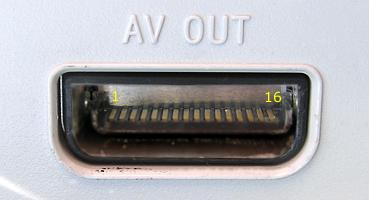
It's the official RGB SCART cable (purchased from Play-Asia). This (on the DC end) has pins on position 1-4, 7, 10, 14-16, the rest are missing.
There's continuity on pin 4 and 10 (DC end) to the following pins:
Dreamcast ---> SCART
Pin 4 (+12V) ---> SCART pin 16
Pin 10 (composite sync) ---> SCART pin 20
I never managed to get a solid picture on the CRT, instead, i managed to short pin 4 which no longer outputs +12V. I'd be thankful to know if that can be fixed or not.
Pin 4 is marked "TP626" in the logic board schematic (and that's as far as I have gotten):
http://brn.ildjarn.com/txt/dreamcast.sc ... ectors.pdf
 :
:
http://www.gamesx.com/wiki/doku.php?id=av:dreamcastav
so yes.. this is still broken for me..
This hasn't been a problem (I use the VGA box) but has come up again after a recent rearrangement in my living room
It's the official RGB SCART cable (purchased from Play-Asia). This (on the DC end) has pins on position 1-4, 7, 10, 14-16, the rest are missing.
There's continuity on pin 4 and 10 (DC end) to the following pins:
Dreamcast ---> SCART
Pin 4 (+12V) ---> SCART pin 16
Pin 10 (composite sync) ---> SCART pin 20
I never managed to get a solid picture on the CRT, instead, i managed to short pin 4 which no longer outputs +12V. I'd be thankful to know if that can be fixed or not.
Pin 4 is marked "TP626" in the logic board schematic (and that's as far as I have gotten):
http://brn.ildjarn.com/txt/dreamcast.sc ... ectors.pdf
:http://www.gamesx.com/wiki/doku.php?id=av:dreamcastav
so yes.. this is still broken for me..
This hasn't been a problem (I use the VGA box) but has come up again after a recent rearrangement in my living room
Kasreyn @ www.frugalgaming.co.uk