Can you help me set up a BVM monitor?
-
Huggers

- Posts: 36
- Joined: Sat Dec 13, 2014 4:54 pm
Can you help me set up a BVM monitor?
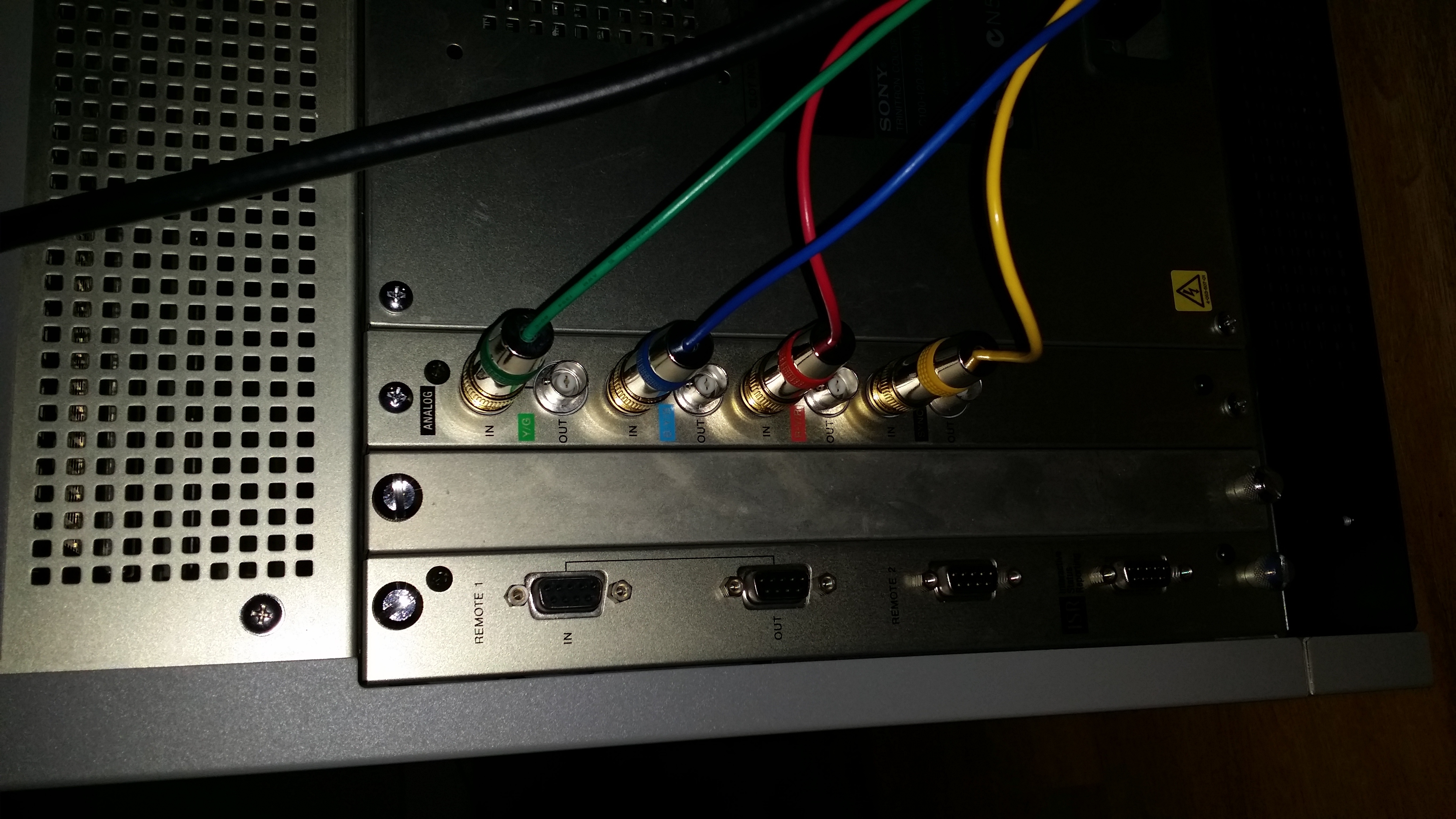
Hi guys. New to the boards. Just got a rather nice BVM but am having a little trouble. I connected up a scart to bnc cable (with sync) into the back of it like so (http://abload.de/img/20141213_1633457zu2a.jpg) and yet I can't get anything out of the screen. I set the channel to RGB but still nothing. What am I doing wrong? Go easy on a newbie!
-
Fudoh

- Posts: 13045
- Joined: Mon Mar 06, 2006 3:29 am
- Location: Germany
- Contact:
Re: Can you help me set up a BVM monitor?
Scart to BNC cables have a dedicated direction, so make sure yours is wired to go FROM Scart TO BNC.
And in the menu you have enable EXTERNAL SYNC. The standard is internal sync, which is used for component and RGsB.
And in the menu you have enable EXTERNAL SYNC. The standard is internal sync, which is used for component and RGsB.
-
Huggers
- Posts: 36
- Joined: Sat Dec 13, 2014 4:54 pm
Re: Can you help me set up a BVM monitor?
The cable I'm using is; http://www.retrogamingcables.co.uk/fema ... itors.htmlFudoh wrote:Scart to BNC cables have a dedicated direction, so make sure yours is wired to go FROM Scart TO BNC.
And in the menu you have enable EXTERNAL SYNC. The standard is internal sync, which is used for component and RGsB.
Does this seem correct?
-
Fudoh
- Posts: 13045
- Joined: Mon Mar 06, 2006 3:29 am
- Location: Germany
- Contact:
Re: Can you help me set up a BVM monitor?
On a BVM you don't need the sync stripper. Since your cable has one, you have to make sure that your source is able to power the LM1881 properly by providing a stable +5V output on the proper pin.
-
Huggers
- Posts: 36
- Joined: Sat Dec 13, 2014 4:54 pm
Re: Can you help me set up a BVM monitor?
If pin 8 is not getting 5 volts, will it mean no picture regardless of whether I need the sync or not?
-
Fudoh
- Posts: 13045
- Joined: Mon Mar 06, 2006 3:29 am
- Location: Germany
- Contact:
Re: Can you help me set up a BVM monitor?
yes, the LM1881 won't pass any signal without getting proper power.
-
Huggers
- Posts: 36
- Joined: Sat Dec 13, 2014 4:54 pm
Re: Can you help me set up a BVM monitor?
Thanks very much Fudoh. Seems I need to grab myself a different cable. So annoying, I want to see this thing in action!
-
Fudoh
- Posts: 13045
- Joined: Mon Mar 06, 2006 3:29 am
- Location: Germany
- Contact:
Re: Can you help me set up a BVM monitor?
It's very easy to bypass the IC. Probably easier than buying a new cable.
-
Huggers
- Posts: 36
- Joined: Sat Dec 13, 2014 4:54 pm
Re: Can you help me set up a BVM monitor?
How do I do this?Fudoh wrote:It's very easy to bypass the IC. Probably easier than buying a new cable.
-
Fudoh
- Posts: 13045
- Joined: Mon Mar 06, 2006 3:29 am
- Location: Germany
- Contact:
Re: Can you help me set up a BVM monitor?
The circuit has two inputs (signal + 5V) and one output. You just have to connect the input and output directly. Just have a look at it. Should be really easy.
-
Huggers
- Posts: 36
- Joined: Sat Dec 13, 2014 4:54 pm
Re: Can you help me set up a BVM monitor?
This is how it looks;Fudoh wrote:The circuit has two inputs (signal + 5V) and one output. You just have to connect the input and output directly. Just have a look at it. Should be really easy.
http://abload.de/img/20141213_205611bzy2d.jpg

which wires to which?
-
Huggers
- Posts: 36
- Joined: Sat Dec 13, 2014 4:54 pm
Re: Can you help me set up a BVM monitor?
After some messing around, I got the thing working through component inputs out of my Wii going directly into the monitor via bnc/phono adapters. The picture is INSANE. So bright and crisp.
Still haven't got RGB working as yet. I get a good picture but the colours are all over the place, bright purple or at times bright red covers the whole screen. Any suggestions for me?
Still haven't got RGB working as yet. I get a good picture but the colours are all over the place, bright purple or at times bright red covers the whole screen. Any suggestions for me?
-
Fudoh
- Posts: 13045
- Joined: Mon Mar 06, 2006 3:29 am
- Location: Germany
- Contact:
Re: Can you help me set up a BVM monitor?
this would usually mean that the input is still set the YPbPr instead of RGB. You switched it in the menu along with the int/ext. sync switch ?Still haven't got RGB working as yet. I get a good picture but the colours are all over the place, bright purple or at times bright red covers the whole screen. Any suggestions for me?
-
Huggers
- Posts: 36
- Joined: Sat Dec 13, 2014 4:54 pm
Re: Can you help me set up a BVM monitor?
Yes I switched it and the image is so close to be correct. Just way too dark and slightly skewed. It also flickers intermittently.Fudoh wrote:this would usually mean that the input is still set the YPbPr instead of RGB. You switched it in the menu along with the int/ext. sync switch ?Still haven't got RGB working as yet. I get a good picture but the colours are all over the place, bright purple or at times bright red covers the whole screen. Any suggestions for me?
If I switch the Sync from INT to EXT I lose the picture completely
-
Fudoh
- Posts: 13045
- Joined: Mon Mar 06, 2006 3:29 am
- Location: Germany
- Contact:
Re: Can you help me set up a BVM monitor?
you *HAVE* to use ext. sync for RGB sources. If it doesn't work, then your cable doesn't properly pass sync (yet). Did you bypass the LM1881 ??
-
Huggers
- Posts: 36
- Joined: Sat Dec 13, 2014 4:54 pm
Re: Can you help me set up a BVM monitor?
Yeah I removed the chip. Was this a mistake?Fudoh wrote:you *HAVE* to use ext. sync for RGB sources. If it doesn't work, then your cable doesn't properly pass sync (yet). Did you bypass the LM1881 ??
-
Fudoh
- Posts: 13045
- Joined: Mon Mar 06, 2006 3:29 am
- Location: Germany
- Contact:
Re: Can you help me set up a BVM monitor?
No, it certainly wasn't. Can you post a picture of what you did ? Does the sync signal connect to pin 20 of the female scart connector ?
-
Huggers
- Posts: 36
- Joined: Sat Dec 13, 2014 4:54 pm
Re: Can you help me set up a BVM monitor?
I can't right now as I'm not with it but I'll take a photo or two in the morning. Thanks very much for all your help dudeFudoh wrote:No, it certainly wasn't. Can you post a picture of what you did ? Does the sync signal connect to pin 20 of the female scart connector ?
-
Huggers
- Posts: 36
- Joined: Sat Dec 13, 2014 4:54 pm
Re: Can you help me set up a BVM monitor?
right mate. I have pin 20 connected to sync I believe. Here's some pics, not sure how clear they'll beFudoh wrote:No, it certainly wasn't. Can you post a picture of what you did ? Does the sync signal connect to pin 20 of the female scart connector ?
http://abload.de/img/20141215_212555u0si9.jpg

http://abload.de/img/20141215_212610pss8o.jpg

http://abload.de/img/20141215_21263446snf.jpg

-
Fudoh
- Posts: 13045
- Joined: Mon Mar 06, 2006 3:29 am
- Location: Germany
- Contact:
Re: Can you help me set up a BVM monitor?
I can't tell, but on the last pic it looks like you're running a ground line to pin 20 and not the sync signal.
-
Huggers
- Posts: 36
- Joined: Sat Dec 13, 2014 4:54 pm
Re: Can you help me set up a BVM monitor?
I think that must just be the pic. Pin 20 is connected to the yellow sync cable.Fudoh wrote:I can't tell, but on the last pic it looks like you're running a ground line to pin 20 and not the sync signal.
-
Huggers
- Posts: 36
- Joined: Sat Dec 13, 2014 4:54 pm
Re: Can you help me set up a BVM monitor?
Hey Fudoh. Got it working like a dream with the Snes and Mega Drive. It looks phenomenal. The only issue I now have is the Saturn will only output a yellow picture and also the Nes through phono to BNC gives me nothing. Apparently I need a specific adapter card for this? Btw, thanks for all your help, I wouldn't have got it working without you
Edit. The Nes outputs a green image
Edit. The Nes outputs a green image
-
Fudoh
- Posts: 13045
- Joined: Mon Mar 06, 2006 3:29 am
- Location: Germany
- Contact:
Re: Can you help me set up a BVM monitor?
And you Saturn is connected through RGB ? If not, get a RGB cable. Shouldn't be any different from your Mega Drive, both in quality and type of connection.
If you only got the stock connection board, then you don't have a composite video decoder. You would need an extension board like the 20D or 21D to use composite. But if the NES is your only composite source, then you should spend the money on a RGB mod for the NES instead and just forget about composite on the BVM.
If you only got the stock connection board, then you don't have a composite video decoder. You would need an extension board like the 20D or 21D to use composite. But if the NES is your only composite source, then you should spend the money on a RGB mod for the NES instead and just forget about composite on the BVM.
-
Huggers
- Posts: 36
- Joined: Sat Dec 13, 2014 4:54 pm
Re: Can you help me set up a BVM monitor?
http://www.ebay.co.uk/itm/221569634222 is the cable I have for my Saturn. Perhaps it's not up to scratch?Fudoh wrote:And you Saturn is connected through RGB ? If not, get a RGB cable. Shouldn't be any different from your Mega Drive, both in quality and type of connection.
If you only got the stock connection board, then you don't have a composite video decoder. You would need an extension board like the 20D or 21D to use composite. But if the NES is your only composite source, then you should spend the money on a RGB mod for the NES instead and just forget about composite on the BVM.
Thought as much about the NES. RGB mod it is
-
Huggers
- Posts: 36
- Joined: Sat Dec 13, 2014 4:54 pm
Re: Can you help me set up a BVM monitor?
So I plugged in a 20D extension board and plugged in my Nes through composite. It won't work and in the menu the option for composite isn't selectable. Is this board no good for composite after all?Fudoh wrote:And you Saturn is connected through RGB ? If not, get a RGB cable. Shouldn't be any different from your Mega Drive, both in quality and type of connection.
If you only got the stock connection board, then you don't have a composite video decoder. You would need an extension board like the 20D or 21D to use composite. But if the NES is your only composite source, then you should spend the money on a RGB mod for the NES instead and just forget about composite on the BVM.
-
Fudoh
- Posts: 13045
- Joined: Mon Mar 06, 2006 3:29 am
- Location: Germany
- Contact:
Re: Can you help me set up a BVM monitor?
I don't have access to my PDFs right now. Try to find the manual. There's a list of all extension boards and it shows which boards have onboard decoders and which don't.
-
mickcris

- Posts: 435
- Joined: Tue Oct 08, 2013 12:43 am
- Location: Texas, USA
Re: Can you help me set up a BVM monitor?
The 20D does not have a decoder in it. See page 44 of the following pdf to see what does what:
http://www.broadcaststore.com/pdf/model ... manual.pdf
assuming you are needing a PAL decoder, you would need a 21D, 25P, or 27T
http://www.broadcaststore.com/pdf/model ... manual.pdf
assuming you are needing a PAL decoder, you would need a 21D, 25P, or 27T
-
Huggers
- Posts: 36
- Joined: Sat Dec 13, 2014 4:54 pm
Re: Can you help me set up a BVM monitor?
Hey man thanks for that. Extremely helpful. Now just to track one of those down!mickcris wrote:The 20D does not have a decoder in it. See page 44 of the following pdf to see what does what:
http://www.broadcaststore.com/pdf/model ... manual.pdf
assuming you are needing a PAL decoder, you would need a 21D, 25P, or 27T